Azure vs AWS for AI Apps: Faster Performance, Lower Complexity, Better Cost Control

Recommended category

Cloud, Azure, AI

Estimated reading time

8–10 minutes

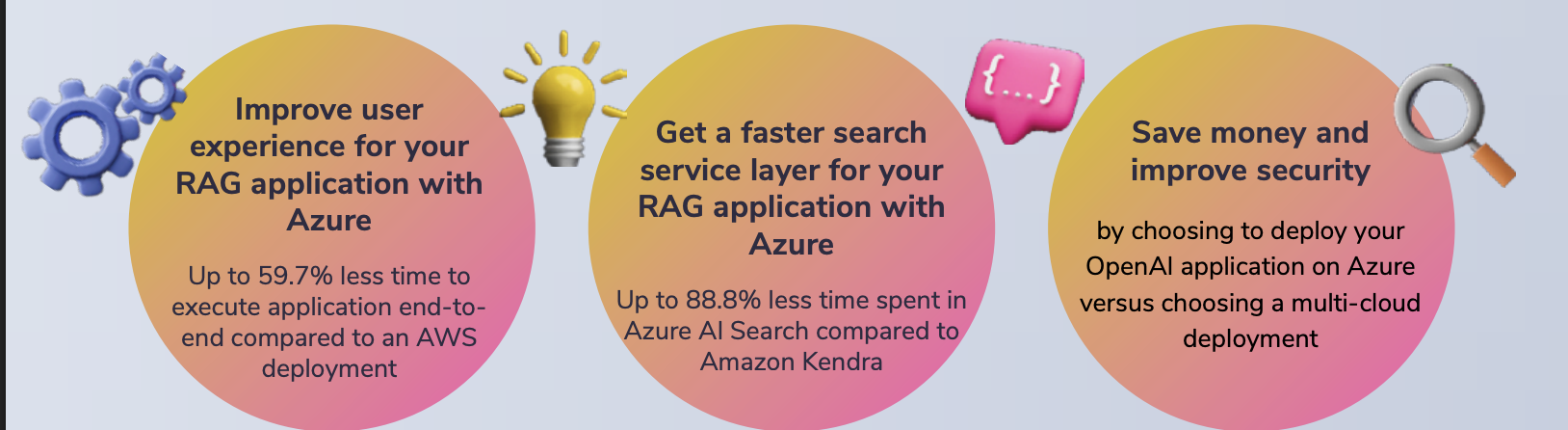
Azure vs AWS for AI applications: what hands-on testing shows about performance, cost and complexity

Introduction

AI is now moving from experiments to real business systems. RAG-based applications and agentic AI are being used to speed up support, improve internal search, generate code, and automate work. The infrastructure choice matters because AI apps are sensitive to latency, rely on several connected services, and often handle valuable or regulated data.

A hands-on test by Principled Technologies compared two approaches to running an AI application using Azure OpenAI. One approach was to host the app on Azure. The other hosted the app on AWS while still calling Azure OpenAI for the model. The results showed clear performance advantages when the application was deployed fully on Azure, especially in the RAG search layer.

Read more

SSD OpenStack VPS with Free Control Panel – 40% Lower Cost Cloud Servers for UK & Global Businesses

Why SSD OpenStack VPS is the Smart Choice for UK Businesses in 2026

Cloud hosting is no longer optional. It’s infrastructure.

If you’re running an e-commerce site, SaaS platform, agency project, or internal business system, you need speed, uptime, and scalability — without enterprise pricing.

That’s where DigitalBerg SSD OpenStack VPS changes the game.

We’ve reduced pricing by 40% while increasing performance and security.

What Makes OpenStack VPS Different?

OpenStack is an enterprise-grade cloud infrastructure used by global providers. Unlike traditional VPS hosting, OpenStack offers:

• High availability architecture

• Distributed storage

• Scalable compute resources

• Enterprise virtualisation

• Faster failover and redundancy

This means your server doesn’t depend on a single machine. It runs inside a cloud cluster.

Result?

Better uptime.

Better performance.

Better reliability. Read more

VPS Hosting UK & Global – High-Performance Cloud Servers at 40% Lower Cost

VPS Hosting UK & Global | 40% Lower Cost SSD Cloud VPS – DigitalBerg

VPS Hosting UK & Global – Now 40% More Cost-Effective

DigitalBerg VPS hosting delivers dedicated virtual resources, enterprise-grade security, and scalable infrastructure — now at up to 40% lower cost compared to standard market pricing.

If your website is outgrowing shared hosting, it’s time to upgrade — without overpaying.

Premium performance. Smarter pricing with vRack infrastructure. Read more

Maximising Website Speed with Unlimited SSD Web Hosting: A Technical Guide

Maximising Website Speed with Unlimited SSD Web Hosting: A Technical Guide

Slow-loading sites lose visitors before your content even appears. Your hosting setup plays a huge role in speed, but not all providers deliver on promises. This guide explains how unlimited SSD web hosting can reduce TTFB, improve Core Web Vitals, and power your site with deca-core CPUs and unlimited bandwidth from DigitalBerg. Read on to map every optimisation step to real-world hosting features that keep your site fast and ready for growth. For more insights on SSD hosting benefits, visit this guide.

SSD Performance Boosts

Unlocking the full potential of your website starts with understanding the power of SSDs. These modern drives significantly reduce loading times and elevate user satisfaction. Read more

VPS Hosting Explained: When to Choose a Virtual Private Server (and How DigitalBerg Makes It Simple)

VPS Hosting Explained: When to Choose a Virtual Private Server (and How DigitalBerg Makes It Simple)

Many small businesses outgrow shared hosting long before they realise it. Traffic spikes slow loading times, security feels shaky, and customisation hits a wall. That’s when a Virtual Private Server steps in — offering server isolation, root access, and scalable resources without the cost of a dedicated server. In this post, you’ll learn when VPS hosting makes sense and how DigitalBerg’s Cloud VPS combines SSD speed, deca-core power, and 24/7 expert support to keep your site fast and secure. For more information about Virtual Private Servers, you can visit this page.

Understanding VPS Hosting

To ensure your website runs smoothly and securely, it’s crucial to understand the different hosting options available. Let’s explore the concept of a Virtual Private Server and why it might be the right choice for your business.

Read more

Virtual Private Servers Explained: When to Choose VPS and How DigitalBerg’s Cloud VPS Delivers Speed, Security, and Scale

Virtual Private Servers Explained: When to Choose VPS and How DigitalBerg’s Cloud VPS Delivers Speed, Security, and Scale

Most websites start on shared hosting, but performance bottlenecks and security gaps can slow your growth. A virtual private server provides dedicated resources and scalable power at a lower cost than a dedicated server. In this post, you’ll learn when VPS hosting makes sense and why DigitalBerg’s Cloud VPS—with SSD storage, deca-core processors, and 24/7 expert support—stands out as a trusted choice for speed, security, and reliable uptime. Learn more about virtual private servers.

Understanding Virtual Private Servers

Virtual private servers (VPS) are a great step up for those outgrowing basic hosting plans. They offer more control, power, and flexibility, allowing your website to perform better under heavier loads.

VPS vs Shared Hosting

Shared hosting is where multiple websites share a single server. It’s like sharing an apartment with roommates—you split resources, which can lead to conflicts. If one site hogs bandwidth, everyone else suffers. The cost is low, making it a popular start for beginners. But when traffic spikes, performance can drop drastically. In contrast, a VPS gives you your own space. Think of it as having your own condo. You have dedicated resources, which translates into more stability and better performance. You won’t compete with others for bandwidth, ensuring your site runs smoothly even during high traffic.

For many small businesses and growing blogs, VPS hosting is the logical next step. Learn more about the benefits of VPS hosting.

VPS vs Dedicated Hosting

Dedicated hosting is like owning a house—you have full control and access to all server resources. It’s powerful but comes with a hefty price tag. A VPS, on the other hand, offers a middle ground. You get many benefits of a dedicated server without the full cost. With a VPS, you enjoy customisation and root access, allowing you to install preferred software and configure settings to your liking. While dedicated servers provide maximum power, they can be overkill for many sites. VPS hosting is ideal for those who need flexibility and control without the financial strain of dedicated hosting.

For businesses and developers, understanding these differences can guide better hosting decisions. Explore more about VPS hosting solutions.

Key Use Cases for VPS Hosting

Moving to a VPS can be a game-changer in how your business scales and adapts to demands.

Small Business Scalability

Small businesses often start with shared hosting but soon encounter limitations. As your business grows, so does your website traffic. A VPS provides scalability and dedicated resources, ensuring that your site can handle increased visitors without a hitch. You can easily upgrade your plan as your needs expand, making VPS hosting a cost-effective solution for growing companies. Many small businesses find that VPS hosting strikes the perfect balance between affordability and capability. By choosing VPS, you set your business up for long-term success. Find out how VPS can benefit your small business.

Developer-Friendly Environment

Developers need control and flexibility to test applications and deploy updates. A VPS offers a customizable environment with root access, letting you tailor the server to your needs. This freedom is crucial when developing new applications or running scripts. You can install any software and configure settings without restrictions. Plus, a VPS allows you to create multiple environments, such as staging and production, on the same server. This setup is invaluable for developers looking to test changes before going live, ensuring a smooth deployment process.

Why Choose DigitalBerg Cloud VPS

DigitalBerg stands out with its commitment to performance, security, and customer satisfaction.

High Performance and Security

DigitalBerg’s Cloud VPS uses deca-core processors and SSD storage to deliver exceptional speed and reliability. Your website will load faster, reducing the risk of losing visitors due to slow page speeds. Security is another priority. With DigitalBerg, your data is protected by advanced security measures, giving you peace of mind. DigitalBerg’s infrastructure is designed to manage high traffic without compromising performance. Choosing DigitalBerg means investing in a hosting solution that grows with your needs while keeping your site secure. Discover more about DigitalBerg’s high-performance hosting.

24/7 Expert Support and Global Reach

Having access to reliable support is crucial. DigitalBerg offers 24/7 expert support, ready to assist whenever you need help. Whether you’re facing technical issues or have questions about your account, their support team is just a message away. This level of service ensures you’re never alone, no matter the time of day. Moreover, DigitalBerg’s global reach enables it to serve clients worldwide, providing localised support tailored to your region. With over 409,000 satisfied clients, DigitalBerg is a trusted name in hosting, dedicated to helping your business succeed.

Choosing a VPS can transform your online presence by providing a stable, flexible platform for growth. DigitalBerg’s Cloud VPS combines high performance, security, and expert support, making it an excellent choice for businesses and developers alike. Explore DigitalBerg’s hosting solutions today.

Discover CachyOS: A Lightning-Fast Linux Distribution Built for Performance

CachyOS is a modern, high-performance Linux distribution designed for users who want speed, flexibility, and full control over their system. Built with aggressive performance optimisations, CachyOS delivers a smooth and responsive experience across desktops, laptops, and cloud environments.

Whether you are a developer, system administrator, or Linux enthusiast, CachyOS offers a clean and powerful platform that performs exceptionally well on both local machines and virtual servers.

Wide Choice of Desktop Environments and Window Managers

One of CachyOS’s strongest features is its flexibility. During installation, users can easily choose from a wide range of popular desktop environments, Wayland compositors, and X11 window managers, including:

KDE Plasma, GNOME, XFCE, Cinnamon, Mate, Budgie, LXQt

i3, Qtile, Openbox

Hyprland, Sway, Wayfire, Niri

COSMIC, UKUI, LDE

This allows you to tailor your Linux setup exactly to your workflow, whether you prefer a full desktop experience or a minimal, keyboard-driven environment.

Ideal for Cloud, VPS, and Azure Deployments

CachyOS is well-suited for cloud and virtualised workloads. Its lightweight footprint and performance-tuned kernel make it an excellent choice for:

• VPS hosting

• Development servers

• CI/CD pipelines

• Remote desktop environments

• Azure virtual machines

Running CachyOS on cloud platforms such as Microsoft Azure can provide faster boot times, reduced latency, and improved responsiveness compared to traditional Linux distributions.

At DigitalBerg, we support modern Linux distributions like CachyOS on our VPS and Dedicated Servers, giving developers the freedom to deploy high-performance systems without compromise.

Internal link example (recommended for Rank Math):

https://digitalberg.com/vps-hosting

https://digitalberg.com/dedicated-servers

Customise Your Experience with Ease

CachyOS makes installation simple with an online installer that lets you select your preferred environment upfront. From there, you can fine-tune every aspect of your system to match your performance and usability needs.

If you value speed, control, and choice, CachyOS is a Linux distribution worth exploring.

Tags

CachyOS, Linux Distribution, Fast Linux OS, Linux for Developers, Linux Desktop, Linux VPS, Cloud Linux, Azure Linux, Wayland, KDE Plasma, GNOME, Hyprland, Linux Performance, Open Source, DigitalBerg

Azure Key Vault Transition to RBAC: What You Must Do Before February 2027

Azure Key Vault Is Moving to RBAC – Are You Ready?

Microsoft has announced a major security change affecting Azure Key Vault users. If you rely on Azure Key Vault for secrets, keys, or certificates, action is required well before 27 February 2027 to avoid service disruption.

All Azure Key Vault API versions earlier than 2026-02-01 will be retired on that date. The upcoming 2026-02-01 API, releasing in February 2026, introduces a critical change: Azure role-based access control (RBAC) becomes the default access model for new vaults.

This shift is designed to improve security, consistency, and governance across Azure environments.

What Is Changing?

Under the new API version:

  • Azure RBAC will be the default access model for new Key Vaults
  • Existing vaults will continue using their current access configuration
  • The Azure Portal experience will remain unchanged
  • Legacy access policies will no longer be assumed by default

If your applications, scripts, or infrastructure templates rely on legacy access policies, you may encounter HTTP 403 permission errors unless changes are made.

Why Azure RBAC Matters

Azure RBAC provides:

  • Centralised identity and access management
  • Fine-grained permissions using Azure Active Directory
  • Better auditing and compliance
  • Consistent security across cloud services

This aligns Key Vault security with the rest of the Microsoft Azure ecosystem, reducing the risk of misconfiguration in production environments.

Required Action Before February 2027

To avoid outages or failed deployments, Microsoft strongly recommends one of the following actions:

Option 1: Migrate all Key Vaults to Azure RBAC

This is the preferred and future-proof approach.

Option 2: Explicitly configure legacy access policies

If you must continue using access policies, you must specify them in:

  • Azure CLI
  • PowerShell
  • REST API
  • ARM templates
  • Bicep
  • Terraform

If you do not explicitly configure this, new vaults will default to RBAC, which can break existing automation.

Common Risks If You Delay

  • Application authentication failures
  • CI/CD pipeline errors
  • Production outages due to missing roles
  • Security gaps caused by misconfigured permissions

This is especially risky for businesses running enterprise workloads, DevOps pipelines, or regulated systems.

How DigitalBerg Helps

At DigitalBerg, we help organisations prepare for platform-level changes like this by designing secure, Azure-ready infrastructure that scales with future updates.

Our servers and cloud solutions are optimised for:

  • Azure-integrated workloads
  • Secure key management
  • Enterprise DevOps pipelines
  • Hybrid and multi-cloud environments

Learn more about our infrastructure services here:

DigitalBerg Servers: https://digitalberg.com

Final Thoughts

The transition to Azure RBAC is mandatory — a security evolution. Planning early gives you time to test, migrate, and secure your environment without pressure.

If you manage Azure infrastructure today, now is the right time to review your Key Vault strategy.

Useful Resources

Microsoft Azure Key Vault documentation

Microsoft Q&A community support

Azure RBAC best practices

Azure

Azure Key Vault

Azure RBAC

Microsoft Azure

Cloud Security

DevOps

Enterprise Cloud

DigitalBerg

Infrastructure Security

How to Choose the Right Unmetered Bandwidth Dedicated Server for Your Business

In today's digital landscape, businesses face mounting demands for reliable, high-performance hosting solutions. As global data traffic continues to surge in 2026, organizations must ensure their online assets remain accessible, resilient, and cost-effective. Selecting the right unmetered bandwidth dedicated server is a pivotal decision for companies handling significant or unpredictable data transfers—whether you're scaling an e-commerce platform, launching SaaS applications, or managing content-heavy media sites. However, with a variety of providers and technical specifications competing for your attention, choosing the most suitable solution is far from straightforward. This comprehensive guide will walk you through the critical factors, actionable strategies, and industry insights required to make an informed, future-ready choice for your business.

Understanding Unmetered Bandwidth Dedicated Servers

Unmetered bandwidth dedicated servers provide clients with unrestricted data transfer at a fixed monthly rate, eliminating the risk of overage charges or throttled connections. Unlike traditional metered servers, which impose strict bandwidth caps, unmetered solutions enable organizations to handle high-traffic spikes, large file transfers, and bandwidth-intensive applications without financial penalties. This makes them particularly attractive for enterprises with unpredictable or consistently high data requirements. In 2026, as remote work, streaming, and real-time collaboration tools drive network consumption, unmetered dedicated servers have become essential infrastructure for businesses seeking stability and scalability.

Key Characteristics of Unmetered Bandwidth Dedicated Servers

Unmetered bandwidth dedicated servers are distinguished by several unique features. These include dedicated hardware resources—CPU, RAM, and storage—reserved exclusively for your organization. Unlike shared hosting or VPS platforms, dedicated servers offer complete control over configurations, operating systems, and security protocols. Most importantly, the unmetered bandwidth component ensures that your data transfer is not tracked or restricted by a monthly quota. Providers typically specify a port speed (e.g., 1Gbps, 10Gbps), which limits the maximum transfer rate, but not the total traffic volume. For businesses with global audiences, content distribution needs, or heavy API integrations, these characteristics make unmetered servers a top choice in 2026's data-driven economy.

Common Use Cases for Unmetered Servers

Businesses across industries leverage unmetered bandwidth dedicated servers for a range of mission-critical applications. Media streaming platforms, such as high-definition video providers or online radio stations, require uninterrupted data delivery to support thousands or millions of concurrent users. E-commerce enterprises experiencing seasonal surges—like Black Friday or Singles' Day—benefit from predictable hosting costs while maintaining site performance during traffic spikes. SaaS companies deploying real-time analytics or collaborative tools need reliable, high-throughput connections to serve global clients. Even enterprise backup, disaster recovery, and file-sharing solutions depend on unmetered bandwidth to rapidly move large datasets without constraints. In each scenario, the unmetered model ensures operational continuity, predictable costs, and competitive advantage.

Evaluating Your Business Requirements

Before selecting an unmetered bandwidth dedicated server, it is essential to assess your organization's technical and operational needs. Start by analyzing your average and peak bandwidth consumption over the past 12-24 months. Identify any seasonal patterns, such as major marketing campaigns or product launches, that could impact future data usage. Additionally, consider the nature of your applications: Are you serving static content, facilitating real-time communications, or processing frequent uploads and downloads? By mapping out your current and anticipated requirements, you can establish a baseline for the minimum port speed, hardware specifications, and network redundancy necessary for optimal performance.

Determining Bandwidth and Port Speed Needs

Bandwidth and port speed are central to the performance of any unmetered dedicated server. Bandwidth refers to the total data transferred over your connection, while port speed indicates the maximum rate at which this data can flow. For example, a 1Gbps port theoretically supports up to 324TB of data transfer per month at full utilization. However, real-world usage is typically lower due to fluctuating traffic patterns and protocol overhead. Assess whether your business requires a 1Gbps, 10Gbps, or even higher port speed. Media-heavy platforms or SaaS products supporting large user bases may need higher port speeds to avoid network congestion and latency. Consult with your IT team or hosting provider to model traffic projections and choose a configuration that offers room for growth without incurring unnecessary costs.

Hardware and Geographic Considerations

In addition to bandwidth, the underlying server hardware and geographic location play a critical role in performance and compliance. High-traffic, database-driven applications demand robust CPUs, ample RAM, and enterprise-grade SSD storage to minimize latency and maximize uptime. Moreover, the physical location of your server—whether in North America, Europe, or Asia—can impact data sovereignty, latency, and regulatory compliance (such as GDPR or CCPA). In 2026, many enterprises deploy multi-region or edge hosting strategies to serve global audiences efficiently. When evaluating providers, ensure they offer hardware customization and multiple data center options to align with your business’s operational footprint.

Comparing Providers: What to Look for in 2026

Reputation and Reliability Metrics

When selecting an unmetered bandwidth dedicated server provider, reputation and reliability should be at the forefront of your criteria. In 2026, businesses leverage third-party review platforms, independent uptime monitors, and industry awards to gauge provider performance. Look for companies with documented service level agreements (SLAs) guaranteeing 99.99% uptime or higher. Examine case studies or testimonials from clients in similar industries to assess real-world reliability. Additionally, investigate the provider’s support structure: Are 24/7 technical support and rapid response times standard? An established track record of minimizing downtime, combined with responsive customer service, is crucial for mission-critical operations.

Network Infrastructure and DDoS Protection

The quality of a hosting provider’s network infrastructure directly affects your server’s resilience and performance. Inquire about the provider’s peering arrangements, backbone connectivity, and redundancy measures. Premium providers invest in multi-homed networks, redundant power supplies, and advanced routing technologies to prevent single points of failure. DDoS protection is also a critical requirement in 2026, given the increasing frequency and sophistication of attacks. Confirm that your provider offers always-on DDoS mitigation, traffic scrubbing, and automated threat detection as part of their standard package. These features protect your business from costly outages and data breaches, ensuring service continuity and safeguarding your reputation.

Transparent Pricing and SLAs

Transparent, predictable pricing is a hallmark of unmetered bandwidth dedicated server solutions. However, not all providers define "unmetered" in the same way. Some may cap bandwidth at a "fair use" threshold or impose port speed limitations that affect performance. Scrutinize service level agreements for hidden fees, bandwidth shaping, or restrictive terms. Look for providers offering clear, comprehensive SLAs that detail uptime guarantees, support response times, and remedies for service failures. In 2026, leading providers also include real-time usage dashboards and monthly performance reports, empowering businesses to track their service levels and optimize resource allocation. Request a detailed proposal and clarify all terms before committing to a long-term contract.

Case Studies: Real-World Examples of Unmetered Bandwidth Dedicated Servers in Action

Global Media Streaming Platform

A global media streaming company faced recurring overage charges and buffering complaints during major releases. After migrating to an unmetered bandwidth dedicated server with a 10Gbps port, the platform supported simultaneous high-definition streams for millions of users across North America and Asia. The provider’s DDoS mitigation and redundant network paths ensured uninterrupted service, even during peak global events. By leveraging a transparent, fixed pricing model, the company reduced its monthly hosting costs by 18% while improving user experience and retention. This scenario underscores the value of unmetered bandwidth: eliminating financial unpredictability while supporting seamless, high-volume content delivery.

SaaS Startup Scaling Globally

A fast-growing SaaS startup needed to support real-time collaboration for enterprise clients in Europe and North America. Their previous cloud hosting arrangement struggled with unpredictable bandwidth costs and occasional throttling. By opting for a dedicated server with unmetered bandwidth and multi-region data center options, the startup achieved predictable monthly expenses and improved application latency for end users. The ability to customize server hardware and leverage local data sovereignty compliance helped secure contracts with large multinational customers. This case highlights how unmetered bandwidth dedicated servers facilitate predictable scaling and regulatory assurance for software companies.

Actionable Steps for Choosing the Right Unmetered Bandwidth Dedicated Server

Step 1: Audit Your Bandwidth and Application Needs

Conduct a comprehensive audit of your organization’s existing bandwidth usage, application requirements, and projected growth. Use analytics tools and historical hosting reports to identify peak traffic periods and bottlenecks. Involve IT, security, and business stakeholders to ensure all operational needs are considered.

Step 2: Define Technical and Compliance Specifications

Document required port speeds, hardware configurations (CPU, RAM, storage), and geographic hosting preferences. Account for regulatory compliance (GDPR, CCPA) and industry-specific data protection mandates when choosing server locations.

Step 3: Shortlist and Compare Providers

Research providers with strong reputations, transparent SLAs, and robust network infrastructure. Compare pricing models, support availability, and security features. Request references or case studies relevant to your industry and use case.

Step 4: Conduct a Pilot or Proof-of-Concept

Before committing to a long-term contract, negotiate a pilot deployment or proof-of-concept. Evaluate real-world performance against your requirements, including uptime, latency, and support responsiveness. Use this period to fine-tune configurations and assess provider fit.

Key Takeaways and Next Steps

  • Unmetered bandwidth dedicated servers offer predictable costs, scalability, and high performance for data-intensive applications.
  • Assess your business’s bandwidth, hardware, and compliance needs before choosing a solution.
  • Prioritize providers with strong reputations, robust infrastructure, DDoS protection, and transparent SLAs.
  • Leverage real-world pilots to validate performance and support.

By following these steps, your organization can confidently select a dedicated server solution that meets today’s demands and tomorrow’s opportunities.

Ready to Upgrade Your Infrastructure?

Choosing the right unmetered bandwidth dedicated server is a strategic investment in your business's reliability, scalability, and cost-efficiency. If you’re seeking expert advice or wish to compare top providers, connect with a trusted hosting consultant today. Take the next step toward seamless digital operations—your customers and teams will thank you.

Conclusion

Selecting the optimal unmetered bandwidth dedicated server for your business in 2026 requires a nuanced understanding of bandwidth demands, technical specifications, and provider reliability. By conducting a thorough needs assessment, evaluating providers on transparency and infrastructure, and leveraging real-world testing, businesses can ensure their online services remain robust and future-ready. The right choice not only streamlines operations and costs but also positions your organization for sustained growth in a data-driven world. For senior professionals tasked with infrastructure decisions, this guide delivers the clarity and actionable insights needed to navigate the dedicated hosting landscape with confidence.

Best Practices for Managing Windows VPS Hosting for Small Businesses

Introduction: The Strategic Advantage of Windows VPS Hosting for Small Businesses

In the rapidly evolving digital landscape of 2026, small businesses face unprecedented challenges and opportunities in their IT infrastructure. Windows VPS hosting has emerged as a foundational solution, offering a balanced blend of performance, scalability, and cost efficiency. Unlike traditional shared hosting, Windows VPS hosting provides dedicated resources, robust security, and full control over the server environment – advantages crucial for businesses aiming to maintain competitiveness and agility. The adoption of Windows-based virtual private servers has increased significantly among small enterprises, as they seek reliable platforms to host business-critical applications, databases, and websites. This guide explores the best practices for managing Windows VPS hosting, ensuring small businesses can harness its full potential while minimizing risks and maximizing return on investment.

Why Choose Windows VPS Hosting Over Alternatives

The decision to opt for Windows VPS hosting over Linux-based or shared environments hinges on several key factors relevant to small businesses. The native compatibility with Microsoft technologies such as ASP.NET, MSSQL, and Exchange is often essential for companies entrenched in the Windows ecosystem. Additionally, Windows VPS offers a familiar user interface and administrative tools (such as Remote Desktop and PowerShell), reducing the learning curve for in-house IT staff. Compared to shared hosting, a VPS delivers isolation, customizable resources, and enhanced security, all at a manageable cost. For small businesses, these factors translate into greater operational control, compliance with industry standards, and the ability to scale infrastructure as needs evolve.

Understanding the Core Components of Windows VPS Hosting

A successful Windows VPS hosting environment is built upon several core components: the hypervisor, the virtual machine, the Windows Server OS, and the resource allocation model. The hypervisor (such as Hyper-V or VMware) creates and manages virtual machines, each running a distinct instance of Windows Server. Resource allocation—including CPU, RAM, disk space, and network bandwidth—must be carefully managed to optimize performance and avoid resource contention. Understanding these components enables small businesses to make informed decisions when selecting a hosting provider and configuring their VPS. Furthermore, choosing the right Windows Server edition (e.g., Windows Server 2022 Standard vs. Datacenter) impacts licensing, features, and scalability.

Selecting the Right Windows VPS Hosting Provider

Choosing a hosting provider is a pivotal first step in the management journey. The market is crowded in 2026, with providers offering diverse plans, features, and support levels. Small businesses must evaluate potential vendors based on uptime guarantees, data center locations, support responsiveness, and compliance with regulatory requirements such as GDPR or HIPAA. Cost is always a consideration, but focusing solely on price can lead to compromises in security or reliability. Instead, businesses should prioritize providers with proven track records, transparent service level agreements (SLAs), and robust infrastructure. Reviewing independent benchmarks and customer testimonials can offer valuable insights into real-world performance and support quality.

Evaluating Essential Features and Add-Ons

Not all Windows VPS hosting plans are created equal. Essential features to scrutinize include backup and disaster recovery options, DDoS protection, managed support tiers, and remote desktop access. Add-ons such as premium storage (NVMe SSDs), advanced firewalls, and one-click application installers can further enhance operational efficiency. In 2026, many providers now integrate AI-driven monitoring tools that proactively identify performance issues and security threats. Small businesses should map these features against their unique operational requirements and future growth plans, ensuring the chosen VPS solution remains relevant as business needs evolve.

Case Study: Selecting a Provider for a Financial Services Firm

Consider a small financial services company migrating from shared hosting to Windows VPS hosting in 2026. Their priority is regulatory compliance, low-latency access for remote staff, and 24/7 support. After evaluating several providers, they select a vendor offering data centers in their region, built-in encryption, automated backups, and a support SLA guaranteeing 15-minute response times. This case underscores the importance of aligning VPS features with industry-specific needs and highlights how careful provider selection contributes to operational resilience and compliance.

Configuring and Securing Your Windows VPS Environment

Proper configuration is crucial to unlocking the full potential of Windows VPS hosting. For small businesses, the initial setup phase sets the tone for ongoing management, security, and performance. Key configuration tasks include setting strong administrator passwords, disabling unnecessary services, configuring firewalls, and applying the latest Windows updates. Security best practices dictate enabling multi-factor authentication (MFA) for all remote connections and restricting access to essential personnel only. By establishing a secure baseline from day one, businesses can mitigate common threats such as brute-force attacks, malware infections, and unauthorized access.

Implementing Advanced Security Measures

Beyond the basics, advanced security for Windows VPS hosting in 2026 includes endpoint detection and response (EDR) tools, intrusion detection systems (IDS), and real-time vulnerability scanning. Small businesses should configure automated patch management to ensure critical updates are applied promptly without manual intervention. Encryption—both at rest and in transit—is now a standard expectation, protecting sensitive data against breach or interception. Regular security audits and penetration testing, either in-house or via third-party experts, further enhance the security posture of the VPS environment. These measures are particularly important for businesses handling financial data, healthcare records, or sensitive customer information.

Example: Strengthening Security for an E-commerce Business

An e-commerce retailer hosting its storefront and customer database on a Windows VPS implements MFA, EDR, and regular vulnerability scans as standard practice. After experiencing a spike in brute-force attack attempts, the company further restricts RDP access to whitelisted IP addresses and deploys an IDS for real-time alerting. These enhancements result in a significant reduction in security incidents and provide customers with greater confidence in the platform’s integrity. This example illustrates the tangible benefits of adopting a layered security approach in a real-world business context.

Optimizing Performance for Business-Critical Applications

Performance optimization is a continuous process in Windows VPS hosting management. Small businesses depend on fast, reliable hosting to support customer-facing websites, internal applications, and remote work solutions. Key performance metrics include CPU utilization, memory usage, disk I/O, and network latency. Monitoring these metrics using tools like Windows Performance Monitor or third-party platforms enables proactive resource management. Businesses should allocate sufficient resources to avoid bottlenecks, but also avoid over-provisioning, which can increase costs unnecessarily. Regular performance reviews and capacity planning are essential to ensure the VPS scales alongside business growth.

Practical Tips for Enhancing VPS Performance

To maximize the efficiency of Windows VPS hosting, small businesses should implement several practical strategies:

  1. Upgrade to NVMe SSD storage for faster read/write operations.
  2. Enable Windows Server features like disk defragmentation and memory compression.
  3. Regularly monitor resource usage and adjust allocations based on workload peaks.
  4. Utilize CDN integration to reduce latency for global users.
  5. Automate routine maintenance tasks such as log cleanup and cache management.

These tactics not only improve application response times but also extend the lifespan of server resources, reducing the need for frequent upgrades.

Case Study: Performance Tuning for a SaaS Provider

A small SaaS company hosts its flagship CRM application on a Windows VPS. After noticing slow response times during peak hours, IT staff analyze performance counters and identify high disk I/O as the bottleneck. By upgrading to NVMe storage and optimizing database indexing, the company reduces average page load times by 40%. Additionally, automated maintenance scripts are scheduled to run during off-peak hours, ensuring consistent performance. This case demonstrates the value of targeted performance tuning and regular monitoring for sustained business growth.

Managing Backups, Disaster Recovery, and High Availability

Data protection is paramount in today’s business environment. Windows VPS hosting must be underpinned by a robust backup and disaster recovery (DR) strategy. Small businesses should configure automated, incremental backups to offsite or cloud storage, ensuring that critical data can be restored quickly in the event of hardware failure, cyberattack, or accidental deletion. High availability (HA) features, such as failover clustering or geo-redundancy, are increasingly accessible to smaller organizations thanks to affordable VPS solutions. Documenting and regularly testing DR procedures ensures operational continuity and compliance with industry regulations.

Building a Reliable Backup Schedule

Establishing a backup schedule is a critical step for any business leveraging Windows VPS hosting. Best practices include daily incremental backups and weekly full backups, with copies stored in geographically separate locations. Leveraging native Windows Server Backup or third-party solutions like Veeam or Acronis provides flexibility and automation. Regularly verifying backup integrity and performing test restores are essential to ensure data can be recovered when needed. For businesses subject to regulatory oversight, maintaining an audit trail of backup activities supports compliance and audit readiness.

Example: Disaster Recovery Planning for a Marketing Agency

A boutique marketing agency running its project management and email systems on a Windows VPS faces a ransomware incident. Thanks to a well-documented disaster recovery plan, the IT team isolates the affected server, initiates a restore from the previous night’s backup, and resumes operations within hours. This scenario highlights the importance of not only having backup solutions in place but also regularly testing and updating DR processes to minimize downtime and financial impact.

Monitoring, Maintenance, and Ongoing Management

Effective management of Windows VPS hosting is an ongoing endeavor. Routine monitoring ensures early detection of potential issues—such as resource exhaustion, unauthorized access, or hardware anomalies—before they impact business operations. Businesses should utilize comprehensive monitoring platforms that provide real-time alerts, usage analytics, and historical reporting. Scheduled maintenance activities, including OS updates, software patching, and hardware health checks, help maintain security and performance. Documenting all changes and incidents in a centralized log fosters accountability and supports audit requirements.

Automation and Proactive Management Strategies

Automation is now a cornerstone of efficient VPS management for small businesses. Windows PowerShell scripts and third-party orchestration tools enable IT teams to automate patch deployment, user provisioning, and log analysis. AI-powered monitoring platforms can predict potential failures and recommend corrective actions, reducing manual workloads. Proactive management—such as capacity planning and load forecasting—ensures resource allocation remains aligned with business demand. By embracing automation, businesses can reduce human error, lower operational costs, and increase the reliability of their Windows VPS hosting environment.

Example: Automated Maintenance for a Consulting Firm

A consulting firm hosts its document management system on Windows VPS hosting. By implementing automated scripts for nightly updates, log rotation, and disk cleanup, the IT team reduces manual intervention and prevents performance degradation. Additionally, AI monitoring tools alert staff to unusual spikes in resource usage, enabling rapid response. This approach results in higher system uptime and more predictable performance, demonstrating the tangible benefits of automation for small business IT environments.

Actionable Takeaways for Small Business Success

Small businesses leveraging Windows VPS hosting in 2026 should prioritize security, performance, and reliability. Key actionable steps include:

  • Carefully vetting hosting providers based on support, compliance, and infrastructure.
  • Configuring secure, resilient server environments with strong authentication and regular patching.
  • Optimizing resource allocation and utilizing performance monitoring tools.
  • Implementing comprehensive backup and disaster recovery plans.
  • Embracing automation for routine maintenance and proactive management.

By following these best practices, small businesses can create a robust, scalable IT foundation that supports growth and mitigates risk.

Conclusion: Elevating Small Business IT with Expert Windows VPS Hosting Management

In 2026, Windows VPS hosting stands as a critical enabler for small businesses seeking agility, security, and growth. Managing a VPS environment requires a strategic blend of technical expertise, planning, and continuous improvement. From selecting the right provider and configuring robust security to optimizing performance and ensuring business continuity, every step plays a vital role in achieving operational excellence. By adopting the best practices outlined in this guide, senior professionals can confidently navigate the complexities of Windows VPS hosting, transforming their IT infrastructure into a powerful driver of business success. For further guidance or to explore tailored VPS solutions, consult with a trusted IT partner or reach out to expert hosting providers today.

Ready to optimize your Windows VPS hosting environment for small business growth?

Contact our expert team today to schedule a free consultation and discover tailored solutions that align with your unique operational needs. Empower your business with secure, high-performance hosting—reach out now and unlock your IT potential!