DigitalBerg Virtual Private Servers for WordPress: A Complete Guide to Faster, More Reliable WordPress Hosting

WordPress has become one of the most widely used platforms for building business websites, blogs, online stores, portfolios, membership websites, and content-driven platforms. But as a WordPress website grows, traditional shared hosting may no longer provide the performance, flexibility, and control that the website requires.

This is where a Virtual Private Server for WordPress can make a significant difference.

A WordPress VPS provides an isolated hosting environment with dedicated resources and greater control over the server configuration. It can be a practical option for businesses, developers, agencies, and website owners who have outgrown shared hosting but do not necessarily need a dedicated physical server.

DigitalBerg Virtual Private Servers for WordPress are designed for users who want more control, performance, flexibility, and reliable infrastructure for their WordPress websites.

What Is a VPS for WordPress?

A Virtual Private Server is a virtualized server environment that runs on physical server infrastructure. Unlike traditional shared hosting, where many websites share the same hosting environment and compete for resources, a VPS provides an isolated environment with resources allocated to your virtual server.

For WordPress users, this can provide greater control over:

  • Server resources
  • Operating system
  • Software configuration
  • WordPress environment
  • Security settings
  • Server-level optimization
  • Applications and services
  • Website scaling

DigitalBerg’s VPS infrastructure is built around high-performance virtual servers, SSD storage, root access, and flexible server configurations.

Why Does WordPress Need Better Hosting as It Grows?

A new WordPress website may work perfectly well on basic shared hosting.

However, as traffic, content, plugins, customers, and functionality increase, hosting requirements can change.

For example, a growing website may experience:

  • Slower page loading
  • Higher resource usage
  • Increased database activity
  • More simultaneous visitors
  • Plugin and application demands
  • Traffic spikes
  • Limited server configuration options

Shared hosting can be suitable for smaller websites, but websites with increasing resource requirements may benefit from moving to a VPS.

A VPS gives the website owner more control over the hosting environment and allows server resources to be managed according to the website’s requirements.

Benefits of Using a VPS for WordPress

1. Dedicated Resources for Better Consistency

One of the major advantages of VPS hosting is resource isolation.

Instead of relying entirely on a shared hosting environment, your WordPress website operates inside its own virtual server environment.

This can help provide more predictable performance when compared with heavily shared environments.

DigitalBerg describes its VPS infrastructure as providing dedicated resources and isolated VPS environments.

For WordPress websites receiving regular traffic, this additional resource control can be particularly useful.

2. SSD Storage for Faster Website Operations

Storage performance matters for WordPress because websites constantly read and write data.

Your WordPress installation, database, themes, plugins, media files, and other website resources all depend on server storage.

DigitalBerg offers SSD-powered VPS infrastructure designed for high performance workloads. Its VPS information highlights SSD storage and high I/O performance as part of the platform.

Faster storage can contribute to improved server responsiveness, although overall WordPress speed also depends on factors such as:

  • Website code
  • Theme quality
  • Plugins
  • Database optimization
  • Caching
  • Images
  • CDN configuration
  • Network performance

In other words, VPS hosting is an important part of the performance equation, but it is not the only factor.

3. Full Root Access

Another important advantage of VPS hosting is control.

DigitalBerg VPS solutions provide root access, giving technically experienced users greater control over their server environment.

With root access, users can configure their environment according to their technical requirements, install appropriate software, manage services, and make server-level changes.

This is particularly useful for:

  • WordPress developers
  • Agencies
  • System administrators
  • Advanced website owners
  • Businesses with custom requirements

If you are not comfortable managing a server, however, it is important to understand what level of management and support you require before selecting a VPS.

4. More Control Than Shared Hosting

Shared hosting is designed to simplify website hosting. It can be a good starting point, but it generally provides less control.

A VPS sits between shared hosting and a dedicated server in terms of infrastructure and control.

You receive your own virtual environment while using physical server infrastructure that may host multiple virtual machines.

This makes VPS hosting an attractive option for websites that need more flexibility without immediately moving to a dedicated server.

DigitalBerg VPS for WordPress: Why Consider It?

DigitalBerg has a long-standing focus on hosting, VPS infrastructure, cloud solutions, and WordPress. The company specifically highlights WordPress expertise as part of its services and says WordPress installation is one of its core areas.

DigitalBerg’s hosting infrastructure also emphasizes SSD performance, scalable hosting, dedicated support, and server-level control.

For WordPress users, this combination can be useful when moving beyond basic shared hosting.

Key DigitalBerg VPS Features

Depending on the VPS configuration, DigitalBerg provides features such as:

  • SSD-based storage
  • Dedicated VPS resources
  • Root access
  • High-speed network connectivity
  • VPS control panel options
  • 24/7 support
  • Optional snapshots and backup solutions
  • Flexible server configurations
  • Multiple operating system and application options

DigitalBerg’s published VPS information also lists options for control panels such as Plesk and cPanel, along with support and VPS management features.

Is a VPS Better Than Shared Hosting for WordPress?

There is no single hosting solution that is best for every WordPress website.

The right choice depends on your website’s traffic, technical requirements, budget, expected growth, and level of server management experience.

Feature Shared Hosting WordPress VPS
Resource isolation Limited Higher
Server control Limited High
Root access Usually unavailable Available with VPS
Scalability Limited More flexible
Custom configuration Limited Extensive
Suitable for growing websites Sometimes Often
Technical knowledge Lower Higher
Performance control Limited Greater

If you are running a small personal blog with limited traffic, shared hosting may be sufficient.

If you are managing a business website, eCommerce store, high-traffic blog, membership platform, or multiple WordPress installations, a VPS may provide the additional flexibility you need.

When Should You Move WordPress to a VPS?

There is no fixed traffic number that automatically means you need a VPS.

Instead, look at the symptoms and requirements of your website.

You may want to consider VPS hosting if:

Your Website Is Consistently Slow

If your WordPress website remains slow despite optimizing images, plugins, themes, caching, and other website elements, the hosting environment may need to be reviewed.

You Are Experiencing Resource Limits

Frequent CPU, RAM, process, or other hosting resource limitations can be a sign that your website has outgrown its current hosting plan.

Your Traffic Is Increasing

A growing audience means more simultaneous requests and server activity.

A VPS can give you more control over available resources as your website grows.

You Need Server-Level Customization

Developers and agencies often need to install specific software or configure server services.

A VPS provides considerably more control than typical shared hosting.

You Are Hosting Multiple WordPress Websites

Agencies, developers, and businesses managing several websites may benefit from a VPS environment that provides more control over hosting resources and server configuration.

VPS Hosting for WordPress Developers and Agencies

Developers often need more flexibility than standard hosting plans provide.

A VPS can provide a development-friendly environment where professionals can configure server settings, install required software, manage applications, and control their hosting environment.

For agencies, VPS hosting can also be useful for hosting multiple client websites.

Instead of purchasing separate basic hosting accounts for every project, an appropriately configured VPS can provide a centralized environment.

However, resource planning is important. The VPS should have enough CPU, RAM, storage, and network capacity for the number and type of websites being hosted.

VPS Hosting for WooCommerce Websites

WooCommerce adds additional complexity to a WordPress website.

An online store may need to handle:

  • Product searches
  • Customer accounts
  • Shopping carts
  • Checkout processes
  • Payment integrations
  • Inventory operations
  • Database queries
  • Order processing

During promotional campaigns or seasonal sales, traffic can also increase quickly.

For growing WooCommerce stores, having greater control over server resources can be valuable.

A VPS can provide a stronger infrastructure foundation, while WordPress and WooCommerce optimization should still be handled at the application level.

How VPS Hosting Can Support WordPress Performance

Website speed depends on many components.

A well-configured VPS can provide a strong foundation, but the WordPress website itself must also be optimized.

For better performance, consider combining VPS hosting with:

  • Page caching
  • Object caching
  • Image optimization
  • Lightweight themes
  • Optimized plugins
  • Database maintenance
  • Content Delivery Network (CDN)
  • GZIP or Brotli compression
  • Updated PHP version
  • Optimized server configuration

This approach is more effective than expecting hosting alone to solve every performance problem.

WordPress Security on a VPS

Hosting security should be treated as a combination of infrastructure and website-level protection.

At the server level, VPS users can implement appropriate security measures such as:

  • Strong authentication
  • Secure SSH configuration
  • Firewall rules
  • Regular software updates
  • Malware monitoring
  • Security plugins
  • Least-privilege access
  • Regular backups
  • Monitoring and logging

WordPress itself should also be kept updated.

Themes and plugins should be maintained carefully because outdated software can introduce security risks.

DigitalBerg also publishes an Acceptable Use Policy covering its VPS, cloud infrastructure, and related hosting services.

Backup and Recovery Considerations

No hosting environment should be treated as a substitute for a proper backup strategy.

Before moving a WordPress website to a VPS, consider:

  • How frequently backups are created
  • Where backups are stored
  • How long backups are retained
  • Whether backups are separate from the main server
  • How quickly the website can be restored
  • Whether database backups are included

DigitalBerg’s VPS information includes snapshot functionality and optional backup-related features on certain configurations.

For important business websites, maintaining an independent backup strategy is still recommended.

How to Choose the Right VPS for WordPress

Choosing the right VPS configuration is not simply about selecting the largest available server.

Start with your actual requirements.

Consider Your CPU Requirements

Websites with dynamic functionality, WooCommerce, complex plugins, or high traffic may require more processing power.

Consider RAM

RAM affects how many processes and applications can operate efficiently.

A basic blog and a large WooCommerce store will not necessarily have the same memory requirements.

Consider Storage

Estimate your current website size and future requirements.

Remember to consider:

  • WordPress files
  • Images
  • Videos
  • Databases
  • Backups
  • Logs
  • Additional applications

Consider Network Capacity

If your website receives substantial traffic or serves large files, network capacity becomes increasingly important.

DigitalBerg’s VPS infrastructure includes high-speed network connectivity and options designed for demanding workloads.

Consider Management Requirements

A technically experienced developer may prefer full control.

A business owner who does not work with server administration may require more support or management.

Always consider your technical capabilities before selecting a VPS.

DigitalBerg VPS vs Dedicated Server for WordPress

A VPS and dedicated server serve different needs.

A VPS provides a virtualized environment and is generally a more accessible step up from shared hosting.

A dedicated server gives you an entire physical server and therefore provides greater control over physical resources.

DigitalBerg offers both VPS and dedicated server solutions, allowing customers to select infrastructure based on their requirements.

Choose a VPS If:

  • You need more control than shared hosting
  • Your website is growing
  • You need dedicated virtual resources
  • You want flexible server configuration
  • You do not yet require an entire physical server

Consider a Dedicated Server If:

  • You have consistently high resource requirements
  • You need maximum physical resource control
  • You are running demanding applications
  • You require specialized server configurations

The best solution depends on your workload rather than simply choosing the most powerful option.

Common WordPress VPS Mistakes to Avoid

Moving to a VPS can provide more control, but it also creates additional responsibilities.

Choosing Too Much or Too Little RAM

More resources are not always necessary. At the same time, an underpowered server can create performance issues.

Review your current resource usage before choosing a plan.

Installing Too Many Plugins

A powerful server cannot compensate for poorly optimized WordPress plugins.

Remove unnecessary plugins and regularly review your WordPress installation.

Ignoring Updates

Keep WordPress, themes, plugins, operating systems, and server software updated according to your maintenance strategy.

Not Creating Backups

A VPS is not automatically a complete backup solution.

Make sure your backup and recovery strategy is clearly defined.

Forgetting Server Security

Root access provides control, but it also means configuration and security responsibilities must be handled properly.

Frequently Asked Questions About WordPress VPS Hosting

What is the best VPS for WordPress?

The best VPS for WordPress depends on your website’s traffic, resource usage, technical requirements, budget, and growth plans. A suitable VPS should provide adequate CPU, RAM, storage, network capacity, and the level of management you require.

Is VPS hosting good for WordPress?

Yes. VPS hosting can be a strong option for WordPress websites that need more resources, flexibility, isolation, and server control than traditional shared hosting can provide.

Is VPS faster than shared hosting?

A VPS can provide more predictable resource availability and greater control than shared hosting. However, actual WordPress speed depends on the server configuration, website code, database, plugins, caching, media, and network performance.

Does DigitalBerg support WordPress?

DigitalBerg highlights WordPress expertise and provides hosting infrastructure suitable for WordPress websites. Its company information specifically identifies WordPress as a core area of expertise.

Can I host WooCommerce on a VPS?

Yes. A VPS can host WooCommerce, provided the server has sufficient resources and is properly configured for the store’s traffic and workload.

Does a VPS require technical knowledge?

VPS hosting generally requires more technical knowledge than shared hosting, particularly when you have root access and are responsible for server configuration. If you do not have server administration experience, consider the support and management options available with your hosting provider.

Final Thoughts

As a WordPress website grows, hosting requirements can change.

Shared hosting may be perfectly suitable for a new or small website, but growing businesses, developers, agencies, WooCommerce stores, and high-traffic websites may benefit from the additional control and resource isolation offered by a Virtual Private Server.

DigitalBerg Virtual Private Servers for WordPress provide a flexible hosting environment with features such as SSD-based infrastructure, dedicated VPS resources, root access, high-speed connectivity, and technical support.

The key is to choose a VPS configuration that matches your actual WordPress requirements and to combine reliable hosting with proper website optimization, security, monitoring, and backups.

If your WordPress website has outgrown shared hosting and you need greater control over its hosting environment, a WordPress VPS from DigitalBerg can be a practical next step.

Explore the DigitalBerg VPS solutions to find a hosting configuration suited to your WordPress website and technical requirements.

Azure vs AWS for AI Apps: Faster Performance, Lower Complexity, Better Cost Control

Recommended category

Cloud, Azure, AI

Estimated reading time

8–10 minutes

Azure vs AWS for AI applications: what hands-on testing shows about performance, cost and complexity

Introduction

AI is now moving from experiments to real business systems. RAG-based applications and agentic AI are being used to speed up support, improve internal search, generate code, and automate work. The infrastructure choice matters because AI apps are sensitive to latency, rely on several connected services, and often handle valuable or regulated data.

A hands-on test by Principled Technologies compared two approaches to running an AI application using Azure OpenAI. One approach was to host the app on Azure. The other hosted the app on AWS while still calling Azure OpenAI for the model. The results showed clear performance advantages when the application was deployed fully on Azure, especially in the RAG search layer.

Read more

SSD OpenStack VPS with Free Control Panel – 40% Lower Cost Cloud Servers for UK & Global Businesses

Why SSD OpenStack VPS is the Smart Choice for UK Businesses in 2026

Cloud hosting is no longer optional. It’s infrastructure.

If you’re running an e-commerce site, SaaS platform, agency project, or internal business system, you need speed, uptime, and scalability — without enterprise pricing.

That’s where DigitalBerg SSD OpenStack VPS changes the game.

We’ve reduced pricing by 40% while increasing performance and security.

What Makes OpenStack VPS Different?

OpenStack is an enterprise-grade cloud infrastructure used by global providers. Unlike traditional VPS hosting, OpenStack offers:

• High availability architecture

• Distributed storage

• Scalable compute resources

• Enterprise virtualisation

• Faster failover and redundancy

This means your server doesn’t depend on a single machine. It runs inside a cloud cluster.

Result?

Better uptime.

Better performance.

Better reliability. Read more

VPS Hosting UK & Global – High-Performance Cloud Servers at 40% Lower Cost

VPS Hosting UK & Global | 40% Lower Cost SSD Cloud VPS – DigitalBerg

VPS Hosting UK & Global – Now 40% More Cost-Effective

DigitalBerg VPS hosting delivers dedicated virtual resources, enterprise-grade security, and scalable infrastructure — now at up to 40% lower cost compared to standard market pricing.

If your website is outgrowing shared hosting, it’s time to upgrade — without overpaying.

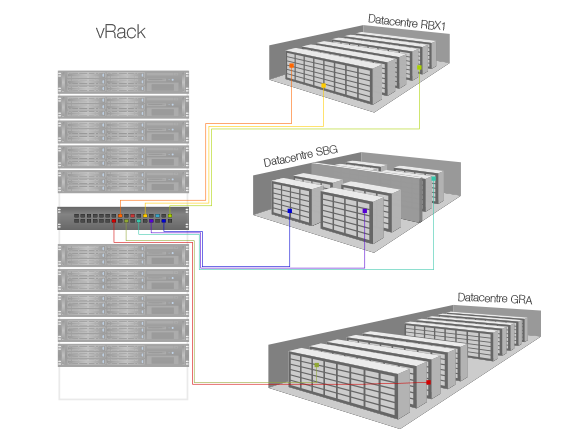
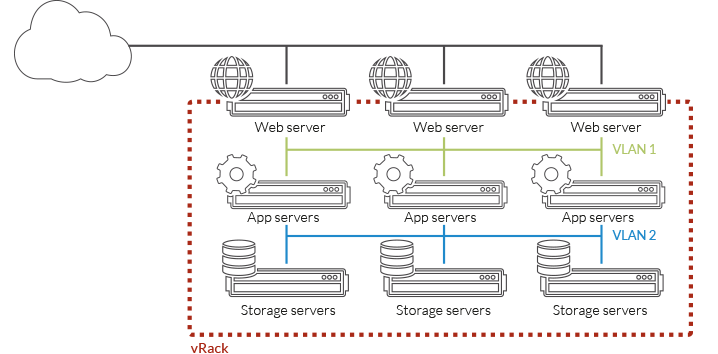
Premium performance. Smarter pricing with vRack infrastructure. Read more

Maximising Website Speed with Unlimited SSD Web Hosting: A Technical Guide

Maximising Website Speed with Unlimited SSD Web Hosting: A Technical Guide

Slow-loading sites lose visitors before your content even appears. Your hosting setup plays a huge role in speed, but not all providers deliver on promises. This guide explains how unlimited SSD web hosting can reduce TTFB, improve Core Web Vitals, and power your site with deca-core CPUs and unlimited bandwidth from DigitalBerg. Read on to map every optimisation step to real-world hosting features that keep your site fast and ready for growth. For more insights on SSD hosting benefits, visit this guide.

SSD Performance Boosts

Unlocking the full potential of your website starts with understanding the power of SSDs. These modern drives significantly reduce loading times and elevate user satisfaction. Read more

VPS Hosting Explained: When to Choose a Virtual Private Server (and How DigitalBerg Makes It Simple)

VPS Hosting Explained: When to Choose a Virtual Private Server (and How DigitalBerg Makes It Simple)

Many small businesses outgrow shared hosting long before they realise it. Traffic spikes slow loading times, security feels shaky, and customisation hits a wall. That’s when a Virtual Private Server steps in — offering server isolation, root access, and scalable resources without the cost of a dedicated server. In this post, you’ll learn when VPS hosting makes sense and how DigitalBerg’s Cloud VPS combines SSD speed, deca-core power, and 24/7 expert support to keep your site fast and secure. For more information about Virtual Private Servers, you can visit this page.

Understanding VPS Hosting

To ensure your website runs smoothly and securely, it’s crucial to understand the different hosting options available. Let’s explore the concept of a Virtual Private Server and why it might be the right choice for your business.

Read more

Virtual Private Servers Explained: When to Choose VPS and How DigitalBerg’s Cloud VPS Delivers Speed, Security, and Scale

Virtual Private Servers Explained: When to Choose VPS and How DigitalBerg’s Cloud VPS Delivers Speed, Security, and Scale

Most websites start on shared hosting, but performance bottlenecks and security gaps can slow your growth. A virtual private server provides dedicated resources and scalable power at a lower cost than a dedicated server. In this post, you’ll learn when VPS hosting makes sense and why DigitalBerg’s Cloud VPS—with SSD storage, deca-core processors, and 24/7 expert support—stands out as a trusted choice for speed, security, and reliable uptime. Learn more about virtual private servers.

Understanding Virtual Private Servers

Virtual private servers (VPS) are a great step up for those outgrowing basic hosting plans. They offer more control, power, and flexibility, allowing your website to perform better under heavier loads.

VPS vs Shared Hosting

Shared hosting is where multiple websites share a single server. It’s like sharing an apartment with roommates—you split resources, which can lead to conflicts. If one site hogs bandwidth, everyone else suffers. The cost is low, making it a popular start for beginners. But when traffic spikes, performance can drop drastically. In contrast, a VPS gives you your own space. Think of it as having your own condo. You have dedicated resources, which translates into more stability and better performance. You won’t compete with others for bandwidth, ensuring your site runs smoothly even during high traffic.

For many small businesses and growing blogs, VPS hosting is the logical next step. Learn more about the benefits of VPS hosting.

VPS vs Dedicated Hosting

Dedicated hosting is like owning a house—you have full control and access to all server resources. It’s powerful but comes with a hefty price tag. A VPS, on the other hand, offers a middle ground. You get many benefits of a dedicated server without the full cost. With a VPS, you enjoy customisation and root access, allowing you to install preferred software and configure settings to your liking. While dedicated servers provide maximum power, they can be overkill for many sites. VPS hosting is ideal for those who need flexibility and control without the financial strain of dedicated hosting.

For businesses and developers, understanding these differences can guide better hosting decisions. Explore more about VPS hosting solutions.

Key Use Cases for VPS Hosting

Moving to a VPS can be a game-changer in how your business scales and adapts to demands.

Small Business Scalability

Small businesses often start with shared hosting but soon encounter limitations. As your business grows, so does your website traffic. A VPS provides scalability and dedicated resources, ensuring that your site can handle increased visitors without a hitch. You can easily upgrade your plan as your needs expand, making VPS hosting a cost-effective solution for growing companies. Many small businesses find that VPS hosting strikes the perfect balance between affordability and capability. By choosing VPS, you set your business up for long-term success. Find out how VPS can benefit your small business.

Developer-Friendly Environment

Developers need control and flexibility to test applications and deploy updates. A VPS offers a customizable environment with root access, letting you tailor the server to your needs. This freedom is crucial when developing new applications or running scripts. You can install any software and configure settings without restrictions. Plus, a VPS allows you to create multiple environments, such as staging and production, on the same server. This setup is invaluable for developers looking to test changes before going live, ensuring a smooth deployment process.

Why Choose DigitalBerg Cloud VPS

DigitalBerg stands out with its commitment to performance, security, and customer satisfaction.

High Performance and Security

DigitalBerg’s Cloud VPS uses deca-core processors and SSD storage to deliver exceptional speed and reliability. Your website will load faster, reducing the risk of losing visitors due to slow page speeds. Security is another priority. With DigitalBerg, your data is protected by advanced security measures, giving you peace of mind. DigitalBerg’s infrastructure is designed to manage high traffic without compromising performance. Choosing DigitalBerg means investing in a hosting solution that grows with your needs while keeping your site secure. Discover more about DigitalBerg’s high-performance hosting.

24/7 Expert Support and Global Reach

Having access to reliable support is crucial. DigitalBerg offers 24/7 expert support, ready to assist whenever you need help. Whether you’re facing technical issues or have questions about your account, their support team is just a message away. This level of service ensures you’re never alone, no matter the time of day. Moreover, DigitalBerg’s global reach enables it to serve clients worldwide, providing localised support tailored to your region. With over 409,000 satisfied clients, DigitalBerg is a trusted name in hosting, dedicated to helping your business succeed.

Choosing a VPS can transform your online presence by providing a stable, flexible platform for growth. DigitalBerg’s Cloud VPS combines high performance, security, and expert support, making it an excellent choice for businesses and developers alike. Explore DigitalBerg’s hosting solutions today.

Discover CachyOS: A Lightning-Fast Linux Distribution Built for Performance

CachyOS is a modern, high-performance Linux distribution designed for users who want speed, flexibility, and full control over their system. Built with aggressive performance optimisations, CachyOS delivers a smooth and responsive experience across desktops, laptops, and cloud environments.

Whether you are a developer, system administrator, or Linux enthusiast, CachyOS offers a clean and powerful platform that performs exceptionally well on both local machines and virtual servers.

Wide Choice of Desktop Environments and Window Managers

One of CachyOS’s strongest features is its flexibility. During installation, users can easily choose from a wide range of popular desktop environments, Wayland compositors, and X11 window managers, including:

KDE Plasma, GNOME, XFCE, Cinnamon, Mate, Budgie, LXQt

i3, Qtile, Openbox

Hyprland, Sway, Wayfire, Niri

COSMIC, UKUI, LDE

This allows you to tailor your Linux setup exactly to your workflow, whether you prefer a full desktop experience or a minimal, keyboard-driven environment.

Ideal for Cloud, VPS, and Azure Deployments

CachyOS is well-suited for cloud and virtualised workloads. Its lightweight footprint and performance-tuned kernel make it an excellent choice for:

• VPS hosting

• Development servers

• CI/CD pipelines

• Remote desktop environments

• Azure virtual machines

Running CachyOS on cloud platforms such as Microsoft Azure can provide faster boot times, reduced latency, and improved responsiveness compared to traditional Linux distributions.

At DigitalBerg, we support modern Linux distributions like CachyOS on our VPS and Dedicated Servers, giving developers the freedom to deploy high-performance systems without compromise.

Internal link example (recommended for Rank Math):

https://digitalberg.com/vps-hosting

https://digitalberg.com/dedicated-servers

Customise Your Experience with Ease

CachyOS makes installation simple with an online installer that lets you select your preferred environment upfront. From there, you can fine-tune every aspect of your system to match your performance and usability needs.

If you value speed, control, and choice, CachyOS is a Linux distribution worth exploring.

Tags

CachyOS, Linux Distribution, Fast Linux OS, Linux for Developers, Linux Desktop, Linux VPS, Cloud Linux, Azure Linux, Wayland, KDE Plasma, GNOME, Hyprland, Linux Performance, Open Source, DigitalBerg

Azure Key Vault Transition to RBAC: What You Must Do Before February 2027

Azure Key Vault Is Moving to RBAC – Are You Ready?

Microsoft has announced a major security change affecting Azure Key Vault users. If you rely on Azure Key Vault for secrets, keys, or certificates, action is required well before 27 February 2027 to avoid service disruption.

All Azure Key Vault API versions earlier than 2026-02-01 will be retired on that date. The upcoming 2026-02-01 API, releasing in February 2026, introduces a critical change: Azure role-based access control (RBAC) becomes the default access model for new vaults.

This shift is designed to improve security, consistency, and governance across Azure environments.

What Is Changing?

Under the new API version:

  • Azure RBAC will be the default access model for new Key Vaults
  • Existing vaults will continue using their current access configuration
  • The Azure Portal experience will remain unchanged
  • Legacy access policies will no longer be assumed by default

If your applications, scripts, or infrastructure templates rely on legacy access policies, you may encounter HTTP 403 permission errors unless changes are made.

Why Azure RBAC Matters

Azure RBAC provides:

  • Centralised identity and access management
  • Fine-grained permissions using Azure Active Directory
  • Better auditing and compliance
  • Consistent security across cloud services

This aligns Key Vault security with the rest of the Microsoft Azure ecosystem, reducing the risk of misconfiguration in production environments.

Required Action Before February 2027

To avoid outages or failed deployments, Microsoft strongly recommends one of the following actions:

Option 1: Migrate all Key Vaults to Azure RBAC

This is the preferred and future-proof approach.

Option 2: Explicitly configure legacy access policies

If you must continue using access policies, you must specify them in:

  • Azure CLI
  • PowerShell
  • REST API
  • ARM templates
  • Bicep
  • Terraform

If you do not explicitly configure this, new vaults will default to RBAC, which can break existing automation.

Common Risks If You Delay

  • Application authentication failures
  • CI/CD pipeline errors
  • Production outages due to missing roles
  • Security gaps caused by misconfigured permissions

This is especially risky for businesses running enterprise workloads, DevOps pipelines, or regulated systems.

How DigitalBerg Helps

At DigitalBerg, we help organisations prepare for platform-level changes like this by designing secure, Azure-ready infrastructure that scales with future updates.

Our servers and cloud solutions are optimised for:

  • Azure-integrated workloads
  • Secure key management
  • Enterprise DevOps pipelines
  • Hybrid and multi-cloud environments

Learn more about our infrastructure services here:

DigitalBerg Servers: https://digitalberg.com

Final Thoughts

The transition to Azure RBAC is mandatory — a security evolution. Planning early gives you time to test, migrate, and secure your environment without pressure.

If you manage Azure infrastructure today, now is the right time to review your Key Vault strategy.

Useful Resources

Microsoft Azure Key Vault documentation

Microsoft Q&A community support

Azure RBAC best practices

Azure

Azure Key Vault

Azure RBAC

Microsoft Azure

Cloud Security

DevOps

Enterprise Cloud

DigitalBerg

Infrastructure Security

How to Choose the Right Unmetered Bandwidth Dedicated Server for Your Business

In today's digital landscape, businesses face mounting demands for reliable, high-performance hosting solutions. As global data traffic continues to surge in 2026, organizations must ensure their online assets remain accessible, resilient, and cost-effective. Selecting the right unmetered bandwidth dedicated server is a pivotal decision for companies handling significant or unpredictable data transfers—whether you're scaling an e-commerce platform, launching SaaS applications, or managing content-heavy media sites. However, with a variety of providers and technical specifications competing for your attention, choosing the most suitable solution is far from straightforward. This comprehensive guide will walk you through the critical factors, actionable strategies, and industry insights required to make an informed, future-ready choice for your business.

Understanding Unmetered Bandwidth Dedicated Servers

Unmetered bandwidth dedicated servers provide clients with unrestricted data transfer at a fixed monthly rate, eliminating the risk of overage charges or throttled connections. Unlike traditional metered servers, which impose strict bandwidth caps, unmetered solutions enable organizations to handle high-traffic spikes, large file transfers, and bandwidth-intensive applications without financial penalties. This makes them particularly attractive for enterprises with unpredictable or consistently high data requirements. In 2026, as remote work, streaming, and real-time collaboration tools drive network consumption, unmetered dedicated servers have become essential infrastructure for businesses seeking stability and scalability.

Key Characteristics of Unmetered Bandwidth Dedicated Servers

Unmetered bandwidth dedicated servers are distinguished by several unique features. These include dedicated hardware resources—CPU, RAM, and storage—reserved exclusively for your organization. Unlike shared hosting or VPS platforms, dedicated servers offer complete control over configurations, operating systems, and security protocols. Most importantly, the unmetered bandwidth component ensures that your data transfer is not tracked or restricted by a monthly quota. Providers typically specify a port speed (e.g., 1Gbps, 10Gbps), which limits the maximum transfer rate, but not the total traffic volume. For businesses with global audiences, content distribution needs, or heavy API integrations, these characteristics make unmetered servers a top choice in 2026's data-driven economy.

Common Use Cases for Unmetered Servers

Businesses across industries leverage unmetered bandwidth dedicated servers for a range of mission-critical applications. Media streaming platforms, such as high-definition video providers or online radio stations, require uninterrupted data delivery to support thousands or millions of concurrent users. E-commerce enterprises experiencing seasonal surges—like Black Friday or Singles' Day—benefit from predictable hosting costs while maintaining site performance during traffic spikes. SaaS companies deploying real-time analytics or collaborative tools need reliable, high-throughput connections to serve global clients. Even enterprise backup, disaster recovery, and file-sharing solutions depend on unmetered bandwidth to rapidly move large datasets without constraints. In each scenario, the unmetered model ensures operational continuity, predictable costs, and competitive advantage.

Evaluating Your Business Requirements

Before selecting an unmetered bandwidth dedicated server, it is essential to assess your organization's technical and operational needs. Start by analyzing your average and peak bandwidth consumption over the past 12-24 months. Identify any seasonal patterns, such as major marketing campaigns or product launches, that could impact future data usage. Additionally, consider the nature of your applications: Are you serving static content, facilitating real-time communications, or processing frequent uploads and downloads? By mapping out your current and anticipated requirements, you can establish a baseline for the minimum port speed, hardware specifications, and network redundancy necessary for optimal performance.

Determining Bandwidth and Port Speed Needs

Bandwidth and port speed are central to the performance of any unmetered dedicated server. Bandwidth refers to the total data transferred over your connection, while port speed indicates the maximum rate at which this data can flow. For example, a 1Gbps port theoretically supports up to 324TB of data transfer per month at full utilization. However, real-world usage is typically lower due to fluctuating traffic patterns and protocol overhead. Assess whether your business requires a 1Gbps, 10Gbps, or even higher port speed. Media-heavy platforms or SaaS products supporting large user bases may need higher port speeds to avoid network congestion and latency. Consult with your IT team or hosting provider to model traffic projections and choose a configuration that offers room for growth without incurring unnecessary costs.

Hardware and Geographic Considerations

In addition to bandwidth, the underlying server hardware and geographic location play a critical role in performance and compliance. High-traffic, database-driven applications demand robust CPUs, ample RAM, and enterprise-grade SSD storage to minimize latency and maximize uptime. Moreover, the physical location of your server—whether in North America, Europe, or Asia—can impact data sovereignty, latency, and regulatory compliance (such as GDPR or CCPA). In 2026, many enterprises deploy multi-region or edge hosting strategies to serve global audiences efficiently. When evaluating providers, ensure they offer hardware customization and multiple data center options to align with your business’s operational footprint.

Comparing Providers: What to Look for in 2026

Reputation and Reliability Metrics

When selecting an unmetered bandwidth dedicated server provider, reputation and reliability should be at the forefront of your criteria. In 2026, businesses leverage third-party review platforms, independent uptime monitors, and industry awards to gauge provider performance. Look for companies with documented service level agreements (SLAs) guaranteeing 99.99% uptime or higher. Examine case studies or testimonials from clients in similar industries to assess real-world reliability. Additionally, investigate the provider’s support structure: Are 24/7 technical support and rapid response times standard? An established track record of minimizing downtime, combined with responsive customer service, is crucial for mission-critical operations.

Network Infrastructure and DDoS Protection

The quality of a hosting provider’s network infrastructure directly affects your server’s resilience and performance. Inquire about the provider’s peering arrangements, backbone connectivity, and redundancy measures. Premium providers invest in multi-homed networks, redundant power supplies, and advanced routing technologies to prevent single points of failure. DDoS protection is also a critical requirement in 2026, given the increasing frequency and sophistication of attacks. Confirm that your provider offers always-on DDoS mitigation, traffic scrubbing, and automated threat detection as part of their standard package. These features protect your business from costly outages and data breaches, ensuring service continuity and safeguarding your reputation.

Transparent Pricing and SLAs

Transparent, predictable pricing is a hallmark of unmetered bandwidth dedicated server solutions. However, not all providers define "unmetered" in the same way. Some may cap bandwidth at a "fair use" threshold or impose port speed limitations that affect performance. Scrutinize service level agreements for hidden fees, bandwidth shaping, or restrictive terms. Look for providers offering clear, comprehensive SLAs that detail uptime guarantees, support response times, and remedies for service failures. In 2026, leading providers also include real-time usage dashboards and monthly performance reports, empowering businesses to track their service levels and optimize resource allocation. Request a detailed proposal and clarify all terms before committing to a long-term contract.

Case Studies: Real-World Examples of Unmetered Bandwidth Dedicated Servers in Action

Global Media Streaming Platform

A global media streaming company faced recurring overage charges and buffering complaints during major releases. After migrating to an unmetered bandwidth dedicated server with a 10Gbps port, the platform supported simultaneous high-definition streams for millions of users across North America and Asia. The provider’s DDoS mitigation and redundant network paths ensured uninterrupted service, even during peak global events. By leveraging a transparent, fixed pricing model, the company reduced its monthly hosting costs by 18% while improving user experience and retention. This scenario underscores the value of unmetered bandwidth: eliminating financial unpredictability while supporting seamless, high-volume content delivery.

SaaS Startup Scaling Globally

A fast-growing SaaS startup needed to support real-time collaboration for enterprise clients in Europe and North America. Their previous cloud hosting arrangement struggled with unpredictable bandwidth costs and occasional throttling. By opting for a dedicated server with unmetered bandwidth and multi-region data center options, the startup achieved predictable monthly expenses and improved application latency for end users. The ability to customize server hardware and leverage local data sovereignty compliance helped secure contracts with large multinational customers. This case highlights how unmetered bandwidth dedicated servers facilitate predictable scaling and regulatory assurance for software companies.

Actionable Steps for Choosing the Right Unmetered Bandwidth Dedicated Server

Step 1: Audit Your Bandwidth and Application Needs

Conduct a comprehensive audit of your organization’s existing bandwidth usage, application requirements, and projected growth. Use analytics tools and historical hosting reports to identify peak traffic periods and bottlenecks. Involve IT, security, and business stakeholders to ensure all operational needs are considered.

Step 2: Define Technical and Compliance Specifications

Document required port speeds, hardware configurations (CPU, RAM, storage), and geographic hosting preferences. Account for regulatory compliance (GDPR, CCPA) and industry-specific data protection mandates when choosing server locations.

Step 3: Shortlist and Compare Providers

Research providers with strong reputations, transparent SLAs, and robust network infrastructure. Compare pricing models, support availability, and security features. Request references or case studies relevant to your industry and use case.

Step 4: Conduct a Pilot or Proof-of-Concept

Before committing to a long-term contract, negotiate a pilot deployment or proof-of-concept. Evaluate real-world performance against your requirements, including uptime, latency, and support responsiveness. Use this period to fine-tune configurations and assess provider fit.

Key Takeaways and Next Steps

  • Unmetered bandwidth dedicated servers offer predictable costs, scalability, and high performance for data-intensive applications.
  • Assess your business’s bandwidth, hardware, and compliance needs before choosing a solution.
  • Prioritize providers with strong reputations, robust infrastructure, DDoS protection, and transparent SLAs.
  • Leverage real-world pilots to validate performance and support.

By following these steps, your organization can confidently select a dedicated server solution that meets today’s demands and tomorrow’s opportunities.

Ready to Upgrade Your Infrastructure?

Choosing the right unmetered bandwidth dedicated server is a strategic investment in your business's reliability, scalability, and cost-efficiency. If you’re seeking expert advice or wish to compare top providers, connect with a trusted hosting consultant today. Take the next step toward seamless digital operations—your customers and teams will thank you.

Conclusion

Selecting the optimal unmetered bandwidth dedicated server for your business in 2026 requires a nuanced understanding of bandwidth demands, technical specifications, and provider reliability. By conducting a thorough needs assessment, evaluating providers on transparency and infrastructure, and leveraging real-world testing, businesses can ensure their online services remain robust and future-ready. The right choice not only streamlines operations and costs but also positions your organization for sustained growth in a data-driven world. For senior professionals tasked with infrastructure decisions, this guide delivers the clarity and actionable insights needed to navigate the dedicated hosting landscape with confidence.