

How to Set Up vRack Private Networking on DigitalBerg Dedicated Servers
Want to connect dedicated servers through a private network? This practical DigitalBerg guide explains what vRack is, how to plan a private VLAN network, how to configure Linux interfaces, and how to test secure communication between eligible Infrastructure Dedicated Servers.

What Is vRack?
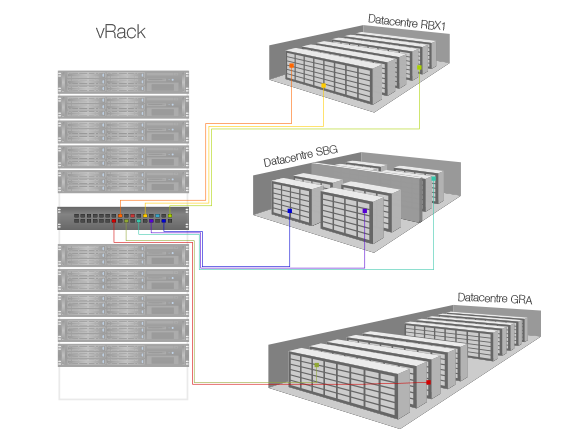
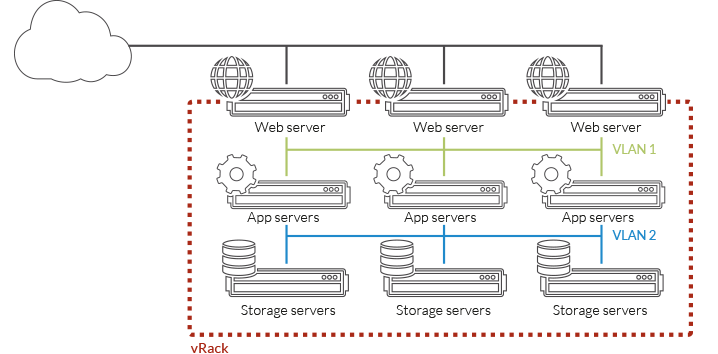
vRack is a private networking solution used to connect compatible servers through isolated network connectivity. DigitalBerg advertises vRack-VLAN networking for eligible dedicated server infrastructure, including Infrastructure Dedicated Servers. A private network can carry internal application, database, storage and backup traffic without directly exposing those services to the public internet.
Important: vRack is also a product name used by OVHcloud. This guide describes the private networking capability advertised by DigitalBerg. Do not assume that every server, data centre, port speed or VLAN feature is supported without confirming the ordered service.
Before You Begin: Requirements
- Two or more eligible DigitalBerg dedicated servers, or another confirmed compatible infrastructure combination.
- Confirmation from DigitalBerg support that the servers are connected to the same supported private network or vRack service.
- Administrative access to the operating systems and their network settings.
- A documented private IP plan, for example
10.20.0.0/24. - A firewall policy allowing only the required server-to-server connections.
Step 1: Choose Compatible DigitalBerg Infrastructure Dedicated Servers
Start with the DigitalBerg Infrastructure Dedicated Servers page. Select the processing, memory, storage and bandwidth appropriate for your workload. Before deployment, ask DigitalBerg to confirm private network eligibility, supported locations, interface details and whether VLAN tagging is needed.
Step 2: Design Your Private Network
For example, assign a private address to each server:
| Server | Role | Example private IP |
|---|---|---|
| Server A | Web/application | 10.20.0.10/24 |
| Server B | Database | 10.20.0.20/24 |
| Server C | Backup | 10.20.0.30/24 |
These addresses are examples only. Choose a subnet that does not conflict with existing internal networks or VPNs. A private subnet is not automatically encrypted.
Step 3: Identify the Correct Private Network Interface
On each Linux server, inspect the available interfaces and routes:
ip -br link
ip -br addr
ip route
Ask DigitalBerg which interface is connected to the private network. Do not guess the interface name or replace the public interface configuration. On Ubuntu, Debian, AlmaLinux and other systems, persistent interface settings vary by distribution and network manager.
Step 4: Assign Private IP Addresses
For a temporary Linux connectivity test, replace ensX with the confirmed private interface name. On Server A:
sudo ip addr add 10.20.0.10/24 dev ensX
sudo ip link set ensX up
On Server B:
sudo ip addr add 10.20.0.20/24 dev ensX
sudo ip link set ensX up
These commands are temporary and normally do not survive a reboot. Use the operating system’s supported network configuration method for permanent settings. Avoid changing the default gateway unless your network design explicitly requires it.
Step 5: Configure VLAN Tagging Only If Required
Some private network designs use VLAN tags to isolate workloads. If DigitalBerg confirms a tagged VLAN is configured, you can inspect VLAN support on Linux with:
ip -d link showFor an illustrative VLAN ID of 100 on a confirmed parent interface ensX, a temporary VLAN interface can be created using:
sudo ip link add link ensX name ensX.100 type vlan id 100
sudo ip addr add 10.20.100.10/24 dev ensX.100
sudo ip link set ensX.100 up
Only apply this example when the provider has confirmed VLAN 100 is permitted and the addressing matches your design. Untagged networks do not require a VLAN subinterface.
Step 6: Test Private Server Connectivity
From Server A, test the private address of Server B:
ping -c 4 10.20.0.20
ip route get 10.20.0.20
If ICMP is blocked, ping may fail even when the network is working. Test the actual application port using a suitable tool such as nc, when installed:
nc -vz 10.20.0.20 3306This example checks whether a MySQL service is reachable. A successful TCP connection does not prove authentication or application security.
Step 7: Secure the Private Network
- Allow database connections only from approved application server IPs.
- Restrict SSH and management interfaces to authorised administrators.
- Apply host firewalls and segmentation between sensitive workloads.
- Use TLS or another appropriate encryption mechanism for sensitive internal traffic.
- Monitor traffic, errors and unexpected connectivity changes.
- Maintain tested backups outside the production failure domain.
Step 8: Build a Production-Ready Architecture
After connectivity testing, document interface names, private subnets, VLAN IDs, firewall rules, monitoring and recovery procedures. For clustered virtualisation, confirm latency, storage and quorum requirements before placing critical services on the private network.
Common vRack Troubleshooting Problems
Servers cannot ping each other
Check that both servers are eligible and connected to the same intended private network, verify the interface and subnet, inspect firewall rules, and confirm whether ICMP is permitted.
VLAN traffic is not passing
Verify the VLAN ID, provider-side VLAN assignment, interface tagging and MTU settings. A VLAN configured only inside Linux will not work unless the underlying network supports it.
Public connectivity stopped working
Review routing and interface configuration. A private interface generally should not replace the server’s existing public default route without an explicit network design.
Performance is lower than expected
Check link negotiation, interface errors, workload throughput, MTU and provider limits. Multi-data-centre traffic may have higher latency than same-site traffic.
vRack vs VLAN vs VPN
| Technology | Main function |
|---|---|
| vRack | Connects compatible hosting infrastructure privately |
| VLAN | Separates traffic logically within supported networks |
| VPN | Typically provides encrypted connectivity across another network |
Frequently Asked Questions
Does DigitalBerg Infrastructure Dedicated Server hosting support vRack?
DigitalBerg advertises vRack private networking for compatible Infrastructure Dedicated Servers. Confirm the exact server and location eligibility before ordering.
Can I use vRack for Proxmox or VMware?
Private networking can carry suitable management, virtual machine or storage traffic. Cluster requirements and available network characteristics must be assessed for each deployment.
Can vRack connect servers across different data centres?
DigitalBerg describes multi-data-centre private networking on its vRack-VLAN page. Confirm the supported locations and specific topology with DigitalBerg.
Is vRack traffic encrypted?
Private network isolation does not necessarily encrypt traffic. Use appropriate application-layer encryption where confidentiality is required.
Do I need a public IP for internal database traffic?
No. Servers on a correctly configured private network can communicate using private IP addresses. Public-facing services may still require public connectivity.
Get Started with DigitalBerg Private Networking
Explore DigitalBerg Infrastructure Dedicated Servers and DigitalBerg vRack-VLAN networking. Contact DigitalBerg support to confirm server compatibility, VLAN configuration and private network capacity before deploying a production workload.










Leave a Reply
Want to join the discussion?Feel free to contribute!