

Azure vs AWS for AI Apps: Faster Performance, Lower Complexity, Better Cost Control
Recommended category
Cloud, Azure, AI
Estimated reading time
8–10 minutes
Azure vs AWS for AI applications: what hands-on testing shows about performance, cost and complexity
Introduction
AI is now moving from experiments to real business systems. RAG-based applications and agentic AI are being used to speed up support, improve internal search, generate code, and automate work. The infrastructure choice matters because AI apps are sensitive to latency, rely on several connected services, and often handle valuable or regulated data.
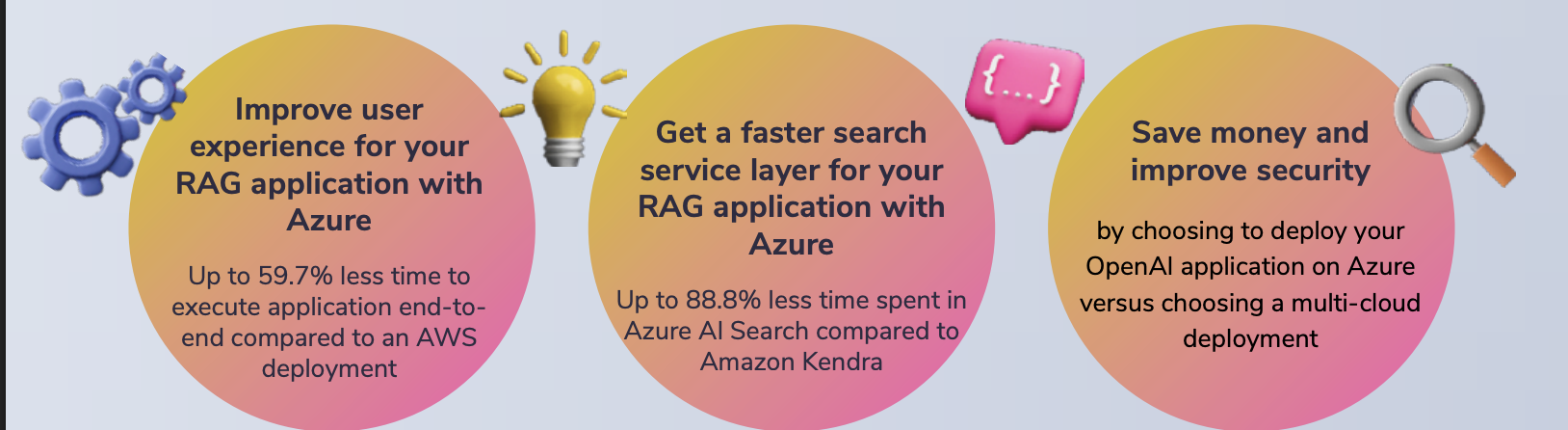
A hands-on test by Principled Technologies compared two approaches to running an AI application using Azure OpenAI. One approach was to host the app on Azure. The other hosted the app on AWS while still calling Azure OpenAI for the model. The results showed clear performance advantages when the application was deployed fully on Azure, especially in the RAG search layer.
What the report tested in simple terms
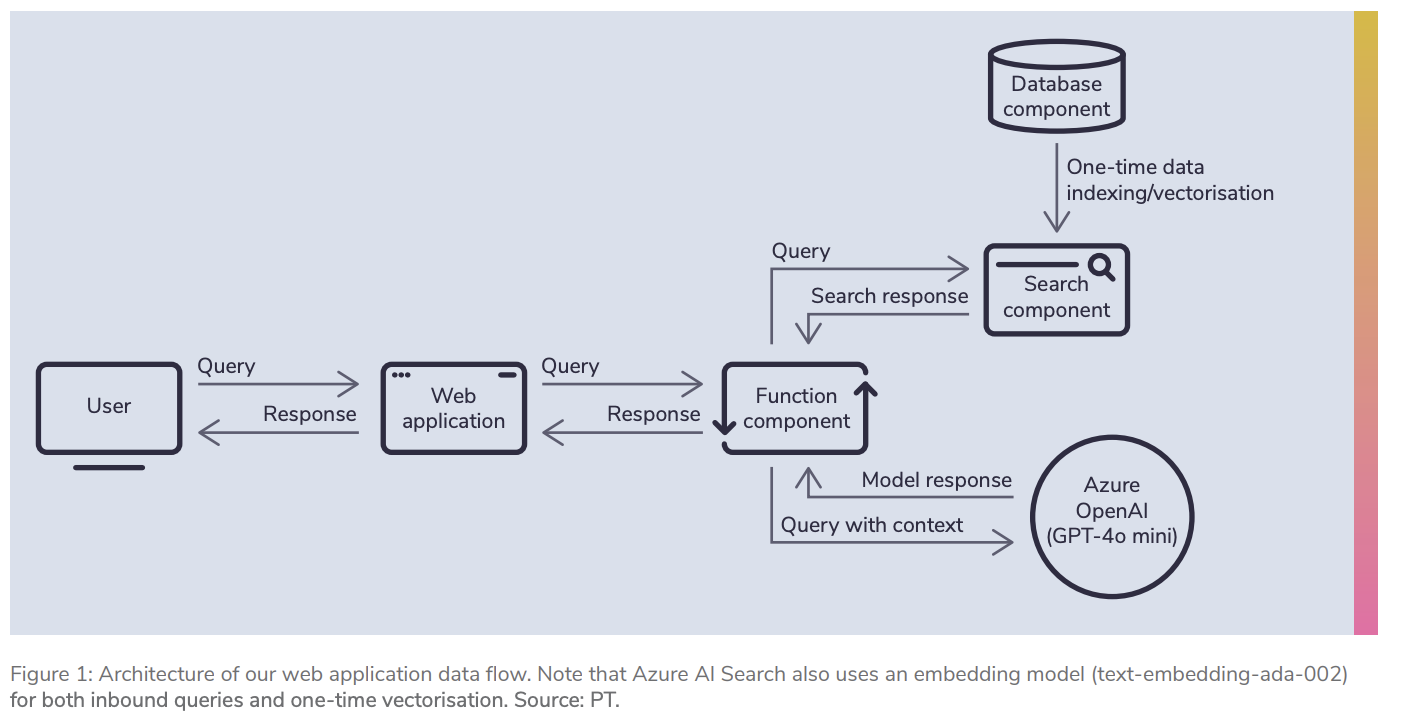
The test used a straightforward RAG application. In a RAG app, the system first searches a knowledge source for relevant context, then sends the user a question along with that context to the language model, and finally streams the answer back to the user.
Both deployments used the same model layer: GPT-4o mini via Azure OpenAI with the same throughput configuration. That was intentional, so differences in results mainly came from the surrounding infrastructure and services.
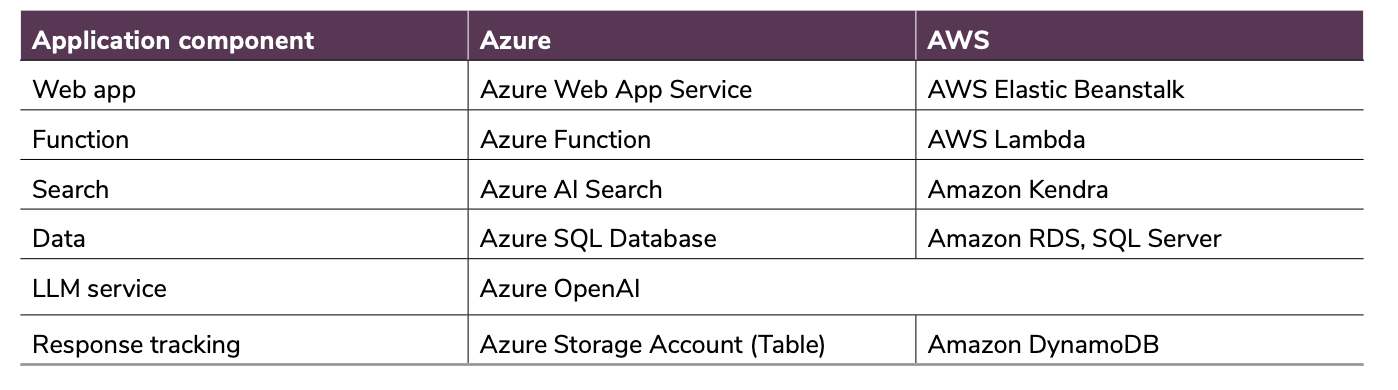
The application included a web layer, a function layer, a search service (for retrieval), a database, and response tracking. The main difference in the retrieval layer was Azure AI Search on Azure versus Amazon Kendra on AWS.
Application Performance Evaluation
Why Performance Matters for AI Applications
When designing and deploying AI applications, performance is critical to delivering a good user experience. Whether the application is a chatbot, an AI assistant, or an automated workflow system, users expect responses to be fast and reliable.
Retrieval-Augmented Generation (RAG) applications depend heavily on multiple layers of infrastructure, including search services, databases, compute resources and language models. If any of these components are slow or poorly configured, the entire application experience can suffer.
For example, if a chatbot takes several seconds to respond to a query, users may become frustrated and abandon the service. On the other hand, fast responses can improve customer satisfaction, increase engagement and help businesses deliver better digital services.
Performance is also important for development teams. AI-assisted coding tools and automated workflows rely on rapid response times to maintain developer productivity.
Several infrastructure factors influence AI application performance, including:
• Compute power and scaling capabilities
• Storage performance and latency
• Network proximity between application components
• Search and indexing performance
• Response time of the language model
Keeping data, compute resources, and AI services geographically close to one another helps minimise communication delays and improves overall response speed.
Ultimately, users care about two main things:
-
How quickly does the application return a complete response
-
How smoothly the response is streamed back to them
These factors were the primary metrics measured during our performance testing.
Key Performance Metrics
To evaluate the application architecture’s efficiency, we focused on two key user-facing metrics.
End-to-End Application Response Time
This metric measures the total time from when a user submits a request to when the AI system delivers the full response.
In practice, this includes the time spent:
• Processing the request
• Searching for contextual data
• Sending prompts to the language model
• Generating and returning the final response
Lower response times result in a smoother user experience and more responsive AI systems.
Time Between Tokens
AI language models generate responses token-by-token. The time between tokens measures how quickly the application streams each part of the response back to the user.
Even small differences in token generation speed can significantly affect perceived performance, particularly for longer responses.
Faster token generation creates the impression of a more responsive and intelligent system.
Performance Testing Scenarios
To evaluate system performance under different levels of demand, we created three testing scenarios that simulated varying numbers of users interacting with the AI application.
Scenario 1: Single User
In the first scenario, a single simulated user submitted 100 individual queries to the application. This test measured baseline performance under minimal load.
Scenario 2: Medium Load – 100 Users
In the second scenario, 100 simulated users interacted with the system. Up to 50 users were active simultaneously, each beginning their session two seconds apart and submitting approximately 70 queries each.
As users completed their sessions, additional users were introduced to maintain the concurrency level.
Scenario 3: High Load – 150 Users
The final test simulated 150 users, with up to 100 concurrent users active at a time. Each user submitted around 70 queries, again starting their session two seconds apart.
This scenario tested how well the application architecture handled higher workloads and increased concurrency.
Testing Configuration
Both deployments were tested using the same language model environment to ensure a fair comparison.
The application used Azure OpenAI with the GPT-4o-mini model, configured with 50 Provisioned Throughput Units (PTUs). This ensured consistent model performance regardless of where the application infrastructure was hosted.
We also used a shared dataset consisting of musical instrument reviews. From this dataset, an AI-generated pool of 280 unique questions was created to simulate realistic user interactions.
Each query retrieved the two most relevant search results, and the contextual data was truncated to approximately 600 characters before being sent to the language model. The maximum response length was limited to 400 tokens, although most responses ranged between 130 and 180 tokens.
Each scenario was executed three separate times, and the median result was selected to ensure reliable measurements.
Observed Performance Trends
During testing, the application architecture hosted entirely within a single cloud environment consistently delivered faster response times.
The most noticeable improvements were observed in the search layer, which plays a critical role in retrieval-augmented AI workflows. Faster retrieval of contextual data enabled the language model to process prompts more quickly and return results more quickly.
In addition, the close proximity of application services within the same cloud environment helped reduce communication delays between components.
Even small improvements in token streaming speed contributed to a smoother user experience when responses were generated.
While the performance differences for small workloads may seem minor, they can become far more significant as applications scale to thousands of users or run high-volume AI workloads.
Key Takeaways
The results demonstrate that infrastructure design has a significant impact on AI application performance.
Keeping application components within the same cloud ecosystem can help reduce latency, simplify deployment and improve overall efficiency.
For organisations deploying AI systems such as chatbots, assistants or automated workflows, selecting the right cloud architecture can make a measurable difference in both performance and operational complexity.
Why performance matters for RAG and agentic AI
Users judge AI tools in seconds. If a chatbot or assistant takes too long to respond, people stop using it. In RAG systems, the search step happens before the model can answer, so slow retrieval makes the whole application feel slow.
For agentic AI, performance matters even more because agents can make multiple tool calls per user request. Any delay compounds across steps, making the experience noticeably worse at scale.
Key performance results: Azure completed requests faster
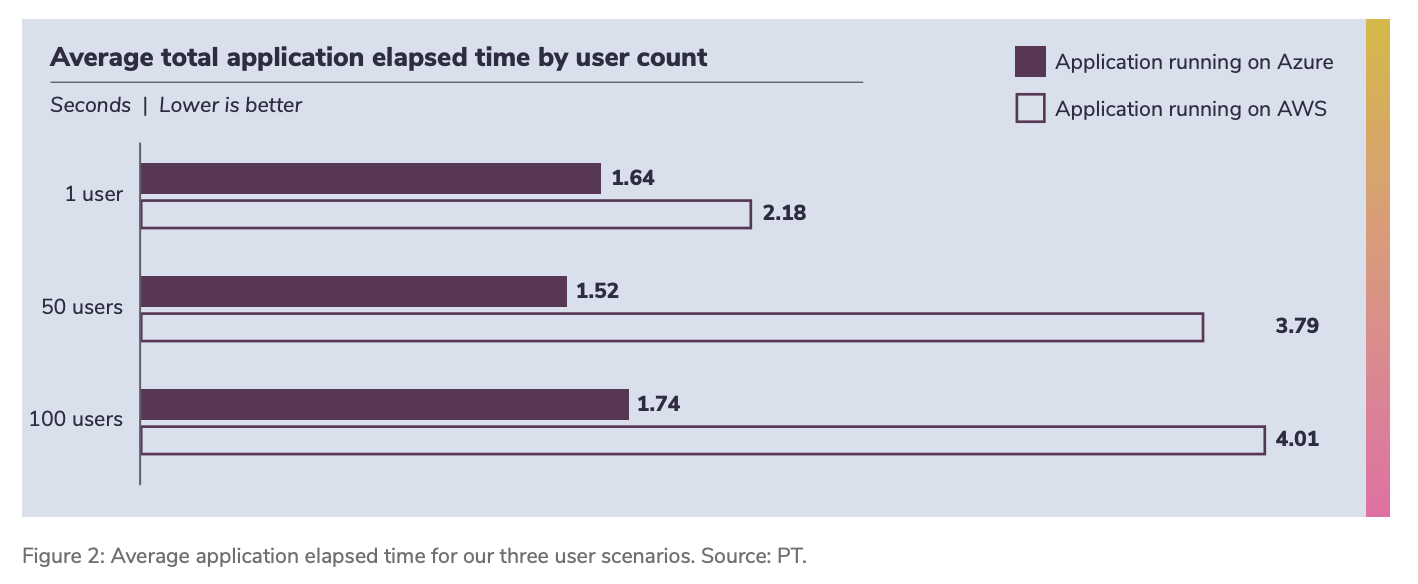
The report measured end-to-end application time, from a user submitting a question to the moment the full answer finishes streaming back.
Azure delivered faster end-to-end times across tests. The performance gap widened as concurrency increased. In higher-user scenarios, Azure showed significant improvements compared with hosting the same application stack on AWS, while still using Azure OpenAI.
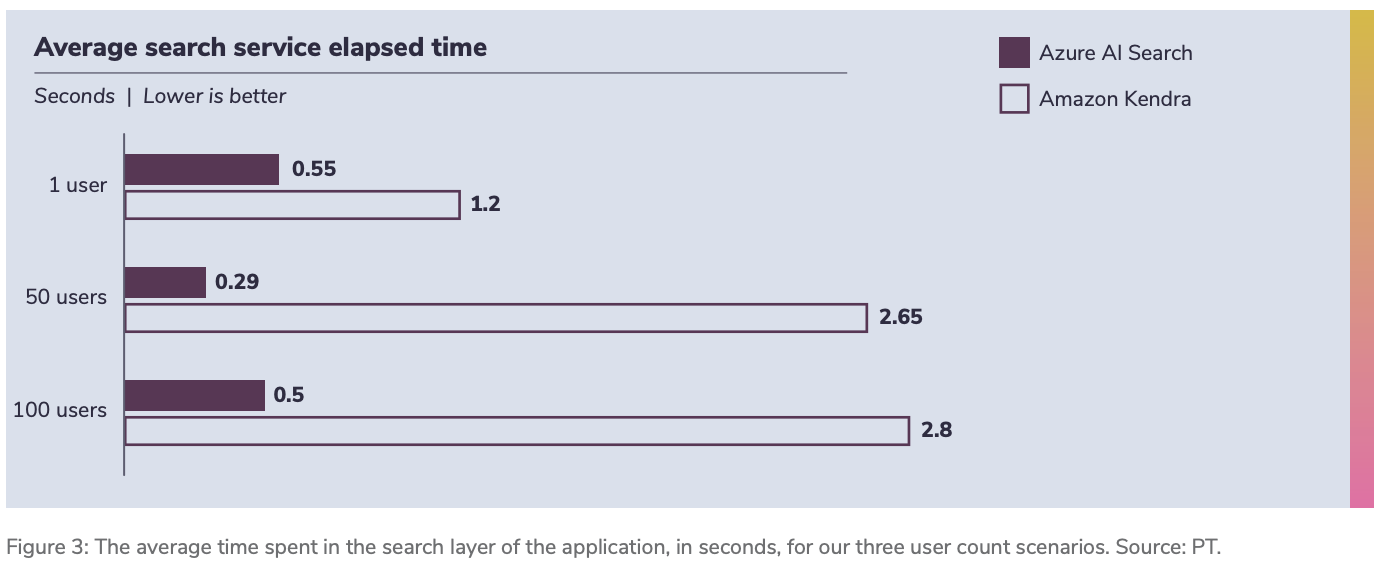
The biggest difference came from the search layer
In RAG, retrieval speed can be the bottleneck. The report found that Azure AI Search returned results much faster than Amazon Kendra in these tests, and that difference grew as user load increased.
This matters because retrieval happens before every model response. Faster retrieval means faster answers, better perceived quality, and more stable behaviour when many users are active simultaneously.
Token streaming was also slightly better on Azure
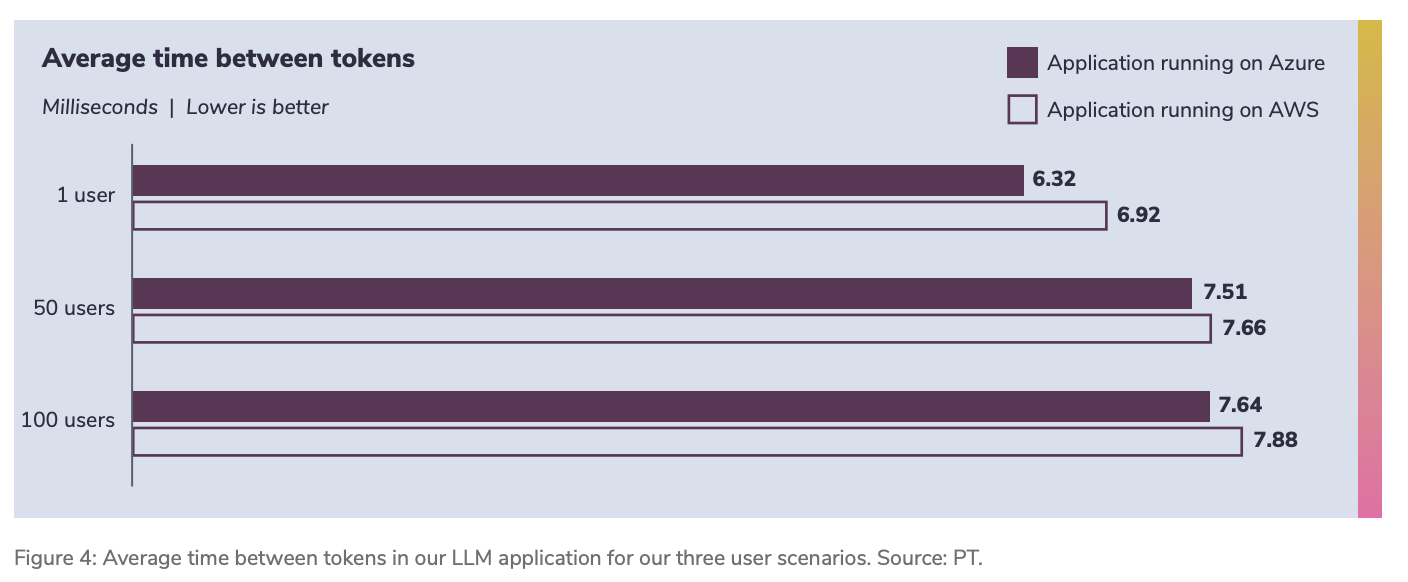
The report also looked at “time between tokens”, which reflects how quickly the application streams the model’s response back to the user. Both deployments used the same Azure OpenAI resource, but the Azure-hosted application exhibited slightly better token-streaming behaviour. Digitalberg dedicated servers are also part of the AWS and are being transferred to Azure Servers with AI foundry
In small tests, this difference can look minor. In production, where applications stream many more tokens across many more users, small per-token improvements add up.
Why a single-cloud approach can reduce cost in practice
The total cost of ownership for AI workloads is not just compute and storage. Costs also appear in networking, operations, tooling, and governance.
A multi-cloud setup can introduce extra costs, such as:
Secure connectivity between providers, which can be expensive and complex
More management overhead because teams operate two consoles, two IAM systems, and different APIs
Higher risk of security gaps due to inconsistent policies and reduced visibility
Harder optimisation because utilisation and cost visibility are split across platforms
If your model layer is already Azure OpenAI, running the rest of the application on Azure can reduce cross-cloud overhead and simplify day-to-day operations.
Security and governance are simpler when the stack is unified
AI applications often touch sensitive customer data, internal documents, or regulated information. Security is not only about encryption. It includes access control, monitoring, audit readiness, and consistent governance.
In a multi-cloud setup, you typically manage multiple identity systems and multiple security tooling stacks. That increases operational workload and can reduce visibility. A single-cloud approach can centralise governance policies and monitoring, reducing the chance of gaps and simplifying compliance work.
If your organisation uses Microsoft security tooling, the integration path is often simpler when the AI application stack is fully on Azure.
What this means for businesses building AI in 2026
If you are using Azure OpenAI for your models, the report’s results support a practical conclusion: hosting the rest of the AI application on Azure can provide faster user experience, stronger retrieval performance, and fewer moving parts to manage.
This is especially relevant for:
RAG assistants connected to the company’s knowledge bases
Customer support chatbots at scale
Agentic AI that uses tools and takes multi-step actions
Applications where security and governance matter
Quick summary
Azure showed faster end-to-end application performance in the hands-on tests
Azure AI Search was a major contributor to the performance gap versus Amazon Kendra
A single-cloud approach can reduce complexity, which often reduces hidden cost and security overhead
The benefits become more important as user concurrency increases
Frequently asked questions
What is a RAG application?
A RAG application retrieves relevant context from a data source and adds it to the prompt sent to the language model, helping the model answer with up-to-date, company-specific information.
Why does the search layer matter so much?
In RAG, retrieval happens before the model can answer. If the search is slow, the entire app feels slow, no matter how good the model is.
Is multi-cloud always a bad idea?
Not always. Some organisations need it due to legacy systems or policy constraints. The point is that multi-cloud can introduce real overhead and performance trade-offs that should be planned for.
If I use Azure OpenAI, should I host the rest of the app on Azure?
Based on this testing, hosting the full stack on Azure can reduce latency and complexity compared with hosting the app on AWS while calling Azure OpenAI across clouds.
Conclusion
AI infrastructure decisions affect user experience, cost control, and security posture. Hands-on testing suggests that when the model layer is Azure OpenAI, keeping the rest of the workload on Azure can deliver faster results and simplify the operating model. For many organisations building RAG and agentic AI, the simplest architecture is often the one that performs best.
Keywords
azure vs aws ai performance, azure openai hosting, rag application hosting, retrieval augmented generation azure, azure ai search vs amazon kendra, ai app latency reduction, single cloud strategy azure, multi cloud ai costs, ai workload performance testing, azure ai foundry models, agentic ai hosting, ai app security governance, azure cloud for ai applications, aws ai app deployment, cloud ai total cost of ownership, enterprise ai deployment, azure ai search performance, uk cloud strategy for ai, london cloud ai hosting, deploy ai apps on azure
Further Reading and Sources:
References
Cloudverse (2025) The hidden costs of multicloud strategies (and how to avoid them). Available at: https://www.cloudverse.ai/blog/hidden-costs-of-multicloud-strategies/ (Accessed: 24 June 2025).
IBM (2024) Cost of a data breach report 2024. Available at: https://www.ibm.com/reports/data-breach (Accessed: 24 June 2024).
Markovate (2025) LLM applications and use cases: impact, architecture and more. Available at: https://markovate.com/blog/llm-applications-and-use-cases/ (Accessed: 24 June 2025).
Microsoft (2025a) Architecture best practices for Azure OpenAI Service – design checklist. Available at: https://learn.microsoft.com/azure/well-architected/service-guides/azure-openai#design-checklist (Accessed: 24 June 2025).
Microsoft (2025b) What is Foundry Agent Service? Available at: https://learn.microsoft.com/azure/ai-foundry/agents/overview (Accessed: 10 July 2025).
Microsoft Security Blog (2025) Enterprise-grade controls for AI apps and agents built with Azure AI Foundry and Copilot Studio. Available at: https://techcommunity.microsoft.com/blog/microsoft-security-blog/enterprise-grade-controls-for-ai-apps-and-agents-built-with-azure-ai-apps-and-agents-built-with-azure-ai-foundry-and/4414757 (Accessed: 5 September 2025).
PacketFabric (2025) Ways to connect multi-cloud: pros, cons and diagrams. Available at: https://packetfabric.com/blog/ways-to-connect-multi-cloud-pros-cons-and-diagrams (Accessed: 24 June 2025).
SaaSworthy (2024) CloudZero pricing. Available at: https://www.saasworthy.com/product/cloudzero/pricing (Accessed: 24 June 2024).
TechRadar (2025) 10 years of Siri: the history of Apple’s voice assistant. Available at: https://www.techradar.com/news/siri-10-year-anniversary (Accessed: 24 June 2025).







Leave a Reply
Want to join the discussion?Feel free to contribute!