

403 Forbidden Error: Causes and How to Fix It
A 403 Forbidden error means a server or security layer understood your request but refused access. The fix depends on who controls that decision. Visitors can check their browser and account; site owners need to identify the rule, permission or application check that rejected the request.
This guide starts with quick browser checks, then explains how to investigate WordPress, Apache, Nginx, Cloudflare and other CDN configurations without opening private content to everyone.
By DigitalBerg · Sources checked 8 November 2026
Summarise this guide with AI
Copy the prompt below, choose your AI assistant, then paste and send it. If the assistant cannot open the article, paste the article text instead. Check its summary against the original before changing server settings.
ChatGPT ↗ Claude ↗ Gemini ↗ Microsoft Copilot ↗ Perplexity ↗ Grok ↗
These links open third-party services; an account may be required. No article text is sent automatically.
Keep DigitalBerg close in Google Search
Choose DigitalBerg in Google’s source preferences, if it is available, and confirm your selection.
Add DigitalBerg as a preferred source on Google ↗
If DigitalBerg is not listed, search for digitalberg.com in the source preferences tool. Availability is controlled by Google.
What does a 403 Forbidden error mean?
HTTP is the protocol browsers use to request pages, images and other resources. A 403 response says the request was understood but the responder will not fulfil it. It can come from the website application, the web server, or an intermediary such as a web application firewall (WAF). The response may appear as “HTTP Error 403”, “Access Denied”, or “You don’t have permission to access this resource”.
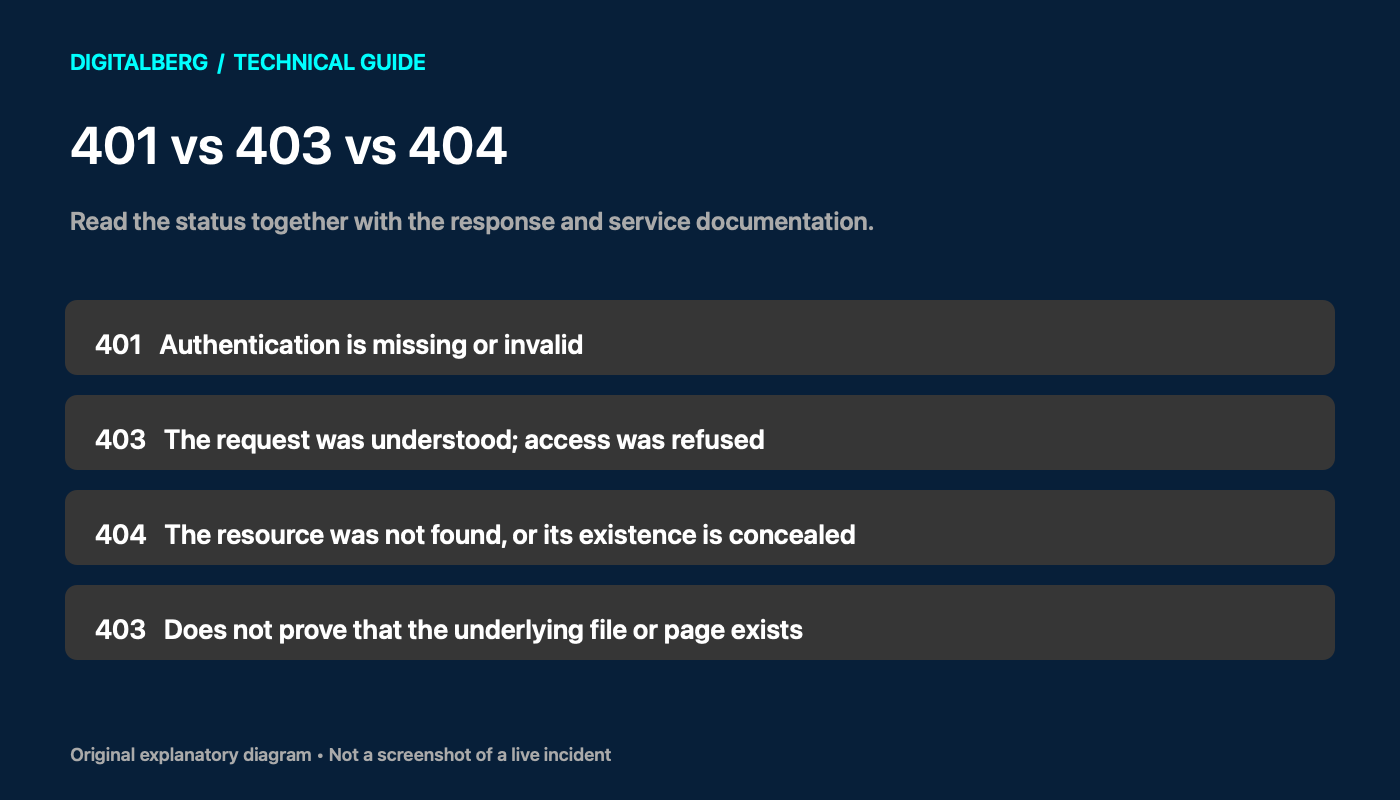
A 403 does not prove that a particular file exists. Access checks can happen before a file lookup, and some systems conceal resource details. Repeating the same refused request usually changes nothing. The current HTTP standard allows retrying with different credentials where appropriate, but warns against automatically retrying with the same credentials.
401 vs 403 vs 404
| Status | Meaning | Useful next check |
|---|---|---|
| 401 Unauthorized | Authentication is missing or invalid; the response includes an authentication challenge. | Check the required login or authentication scheme. |
| 403 Forbidden | The request is understood but refused. Permissions are one possible reason. | Check roles, access policies and the layer issuing the response. |
| 404 Not Found | The resource was not found, or the server declines to disclose its existence. | Check the path and whether the service deliberately hides protected resources. |
MDN’s 403 reference explains why re-authenticating does not fix an unchanged permission decision. Real applications sometimes use codes inconsistently, so read their error body and API documentation as well. For an actual missing WordPress page, see DigitalBerg’s 404 troubleshooting guide.
Common causes of a 403 error
- Account restrictions: a valid account lacks a role, subscription, OAuth scope or WordPress capability.
- Security policies: an IP, country, request pattern, bot signal or hotlink rule triggers a block.
- File access: the web-server process cannot read a file or traverse a parent directory.
- Server configuration: a deny rule, incorrect document root, protected location or absent index document prevents access.
- Request validation: an application rejects a missing or expired request token, or an API requires a different access arrangement.
- CDN or storage configuration: private origin access, signed URLs, domain configuration or request-method policies reject delivery.
A 4xx classification does not mean the visitor caused the problem. A configuration mistake at the website can deny an entirely legitimate request.
How to fix a 403 Forbidden error as a website visitor
- Check the address. Follow a current link from the site’s homepage. A directory URL or old download link may be intentionally restricted.
- Check your account. Use the expected account and confirm you have access to the page. Signing in may resolve an account mix-up, but cannot grant a missing permission.
- Try a private window. This helps isolate browser state. It also signs you out, so a private window failing on a members-only page is not proof of a server fault.
- Clear site-specific data only if necessary. If a fresh session works, remove cookies/cache for that site and sign in again. Expect saved sessions or preferences to disappear.
- Isolate extensions and network settings. Temporarily test relevant privacy extensions. If permitted by your workplace policy, disconnect your own VPN or test another trusted network. A different result suggests a network/IP policy; it does not authorise bypassing a deliberate restriction.
- Contact the owner with evidence. Send the URL, approximate UTC time, action taken, error text and request/Ray ID. Redact personal information and never send passwords or session cookies.
Stop repeatedly refreshing if the page remains forbidden. Browser reinstallations and DNS flushing are poor first steps: a 403 already shows that an HTTP responder answered, although incorrect DNS can sometimes send you to the wrong service.
Site owners: diagnose the block before changing settings
Record one reproducible example: exact hostname and path, HTTP method, affected account type, UTC timestamp and whether the issue affects everyone or just a group. Note recent deployments, plugin updates, firewall changes and migrations. Compare a public page, the failing page and a static asset without probing private paths unnecessarily.
Inspect the real request in your browser
- Open Developer Tools and select Network.
- Reload the affected page once, or reproduce the failed action once.
- Select the failing request. Check its URL, method, status, response headers and response body. A page can load successfully while an image or API call returns 403.
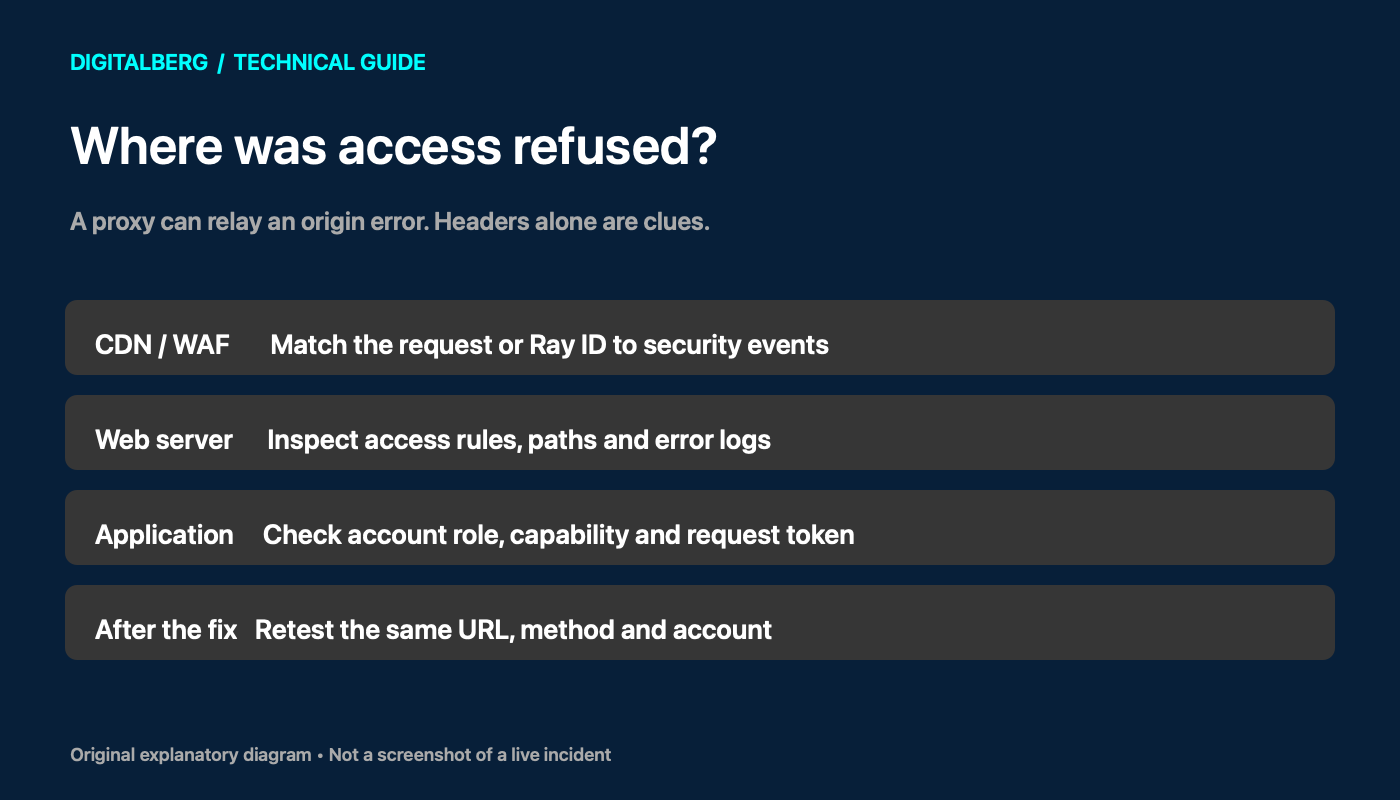
- Match any request identifier and timestamp to CDN, access, error and application logs.
Headers such as server, cf-ray or CDN cache headers are clues, not conclusive attribution: a proxy may relay an origin’s error. HAR files and “Copy as cURL” output can contain cookies, tokens and private URLs. Sanitise them before sharing.
Safe command-line checks
Run these examples only against a site you own or are authorised to troubleshoot. Replace the example URL and local filesystem paths. The first command performs a normal GET and prints headers while discarding the body:
curl --silent --show-error --dump-header - --output /dev/null \
  --max-time 20 'https://example.com/affected-page/'
Do not start with curl -I alone: it sends HEAD, which a service may treat differently from the failing GET. An unauthenticated cURL request also differs from your signed-in browser. Inspect redirects individually before following them, especially when credentials are involved.
On a Linux server, these read-only checks help inspect a known path and recent logs. Paths vary by distribution and hosting platform; elevated access may be required.
namei -l /var/www/example.com/public/index.php
stat /var/www/example.com/public/index.php
sudo tail -n 100 /var/log/nginx/error.log
sudo tail -n 100 /var/log/apache2/error.log
Use only the log path for your installation. Correlate the message with your test rather than assuming the newest entry is related. Keep logs private: they may contain personal data or secret query parameters. If permissions appear correct, check filesystem ACLs and SELinux/AppArmor audit records with your administrator; do not disable mandatory access controls to make a test pass.
How to fix a 403 Forbidden error in WordPress
Before changing files or plugins, confirm a recoverable backup and arrange a staging test where possible. DigitalBerg’s website backup versus server snapshot guide explains why recovery needs more than an assumption that the host has a copy.
1. Identify which WordPress action fails
A public page failing for everyone suggests a different investigation from one editor being unable to save. Test the homepage, the exact admin action and the relevant REST request separately. For a REST response, read the JSON error code and message. Check the user’s capability, authentication method and any required nonce. A nonce validates request intent; it does not grant capabilities.
2. Review security-plugin and host-WAF logs
Look for the failed request at its timestamp. A legitimate page save can trigger a rule because of the submitted content. Reproduce on staging and adjust only the confirmed rule for the necessary path or action. Avoid disabling the entire firewall or creating a blanket exception for /wp-admin/ or /wp-json/.
If a recent plugin change is implicated, isolate that plugin on staging, one change at a time. Disabling every plugin on a live shop can affect checkout, access controls and scheduled tasks. Where wp-admin is inaccessible, ask the host or administrator to isolate the specific component with a recovery plan.
3. Inspect permissions and ownership
WordPress documentation gives 755 for directories and 644 for files as common examples, but the right scheme depends on ownership, groups and the PHP/web-server setup. Sensitive files may need tighter access. The server needs read access to served files and traversal access through parent directories. It does not need every file to be world-writable. Follow the WordPress file-permission guidance and your host’s model; never apply recursive 777 or blanket ownership changes.
4. Review .htaccess carefully on Apache-based hosting
Back up the current file and compare changes with the last working version. Check access-control directives and rewrite rules that deliberately return a forbidden response. Do not delete .htaccess as a generic fix: it may contain security rules and redirects. Saving WordPress permalinks can regenerate WordPress rewrite rules, but it does not repair every access rule and is not a universal 403 remedy. Nginx does not read .htaccess.
5. Retest before clearing caches
Confirm the underlying request now succeeds, then purge only affected cached content where needed. Retest logged-in and logged-out users and confirm that genuinely private content remains denied. A cached response can outlast a configuration repair; clearing caches alone cannot correct the policy that caused it.
Apache and Nginx 403 troubleshooting
Apache: access rules, index files and directory scope
Read the error log for the matching virtual host. Review the relevant <Directory> and <Location> sections, permitted .htaccess overrides, and Require conditions. A rule in a parent directory may affect a child. Apache 2.4 uses Require; old Order, Allow and Deny examples should not be copied blindly. See Apache’s access-control documentation.
If a directory has no configured index file and listing is forbidden, deploy the intended index or correct DirectoryIndex. Enabling directory browsing can expose files and is rarely the right repair. Check that the virtual host points to the intended release directory.
Nginx: root, alias, locations and index handling
Look for a matching error-log message such as a denied directory index or filesystem permission failure. Review the selected server block, root/alias mapping, location precedence, index, try_files, explicit deny or return 403 rules, and symlink restrictions. An internal location is intentionally unavailable to an external request. The Nginx core-module reference explains how these directives map requests to resources.
On PHP sites, also confirm that the web server and PHP-FPM are using the intended release paths and access model. Do not fix a wrong document root by loosening permissions across the entire server.
After a targeted configuration edit, run the appropriate syntax test before any controlled reload:
sudo apachectl configtest
# Or, on an Nginx server:
sudo nginx -t
Command names and service management differ across distributions. These checks validate configuration syntax; they do not prove the access policy is correct. Keep the previous configuration available and test allowed and denied requests after applying the change.
Cloudflare and CDN 403 errors
Cloudflare: separate edge blocks from origin refusals
Capture the URL, UTC time and Ray ID if shown. Check Security Events for a matching request and inspect its action, rule and service. Also review custom rules, managed WAF rules, bot controls, IP/country restrictions and any application-access policies relevant to the site. A branded block page is useful evidence, but the absence of an event does not establish the cause.
Cloudflare’s 403 troubleshooting reference covers both origin and Cloudflare-generated refusals, including some unstyled early errors. Compare origin logs with the same request. A direct-origin test is useful only when authorised and consistent with the site’s architecture: an origin intentionally limited to trusted proxy traffic may correctly deny direct requests. Preserve the hostname and TLS validation; do not switch off proxy protection or expose the origin just to troubleshoot.
When a specific false positive is confirmed, make the smallest suitable rule adjustment and test it. Keep protection for unrelated traffic. A header showing Cloudflare does not, on its own, prove that Cloudflare created the refusal.
AWS CloudFront and S3: check delivery permissions
Check the distribution’s alternate domain configuration, WAF events, origin response and signed-URL/cookie settings. For a private S3 origin, verify that the intended origin access control or identity has the required bucket-policy access. Do not make the bucket public as a shortcut. Also verify the exact object key: a missing or incorrectly cased key can surface as access denied. See AWS’s CloudFront 403 guide.
If only a particular operation fails, verify that its HTTP method is allowed by the distribution behaviour and by the origin. AWS documents this separately under 403 Invalid method. For other CDNs, follow the same pattern: identify edge versus origin, check policy and request details, then consider cached error responses.
Microsoft IIS and API-specific 403 responses
On IIS, use sc-status together with sc-substatus and the relevant error details. Failed Request Tracing can identify the responsible module. Requests rejected before IIS may appear in HTTPERR logs instead. Microsoft’s troubleshooting guide explains where to gather this evidence. Keep detailed diagnostics restricted to administrators rather than exposing server internals to visitors.
For APIs, validate the environment, account entitlement, resource, role and scopes against the endpoint’s own documentation. NHS England Digital’s 4xx guide distinguishes valid credentials without the necessary permission from other failures. Its labels describe NHS APIs; do not assume every service uses identical response bodies.
Fix “Blocked due to access forbidden (403)” in Google Search Console
This report means Google encountered an access refusal for the URL. A page opening in your signed-in browser does not prove that an unauthenticated crawler can retrieve it. A robots.txt Disallow rule is a separate crawling restriction: it does not itself make the web server return HTTP 403.
- Choose a URL that should be public. Review an affected example in Search Console’s Page indexing report. Leave private account, checkout and administrative resources protected.
- Inspect the exact URL. Use URL Inspection and run a live test after any repair. Compare the latest test with the historical indexed result; they describe different points in time.
- Find the failed request. Correlate the inspection time with origin and WAF logs. Check whether a challenge, bot rule, geographic policy or application login requirement stopped access.
- Verify the crawler before making an exception. A Googlebot user-agent string can be forged. Follow Google’s verification guidance, using its published IP ranges or the documented reverse-and-forward DNS procedure. Different Google crawlers and inspection tools may use different ranges.
- Correct the specific policy. Make intended public content accessible without weakening private routes. Do not replace every 403 with a 200 error page or disable the WAF globally.
- Retest and monitor. Confirm a successful response with the real article content. Use the available validation or indexing request options after fixing the issue. Reports can take time to update, and a successful test does not guarantee indexing.
Rank Math’s 403 guide covers finding affected pages through Search Console and its own analytics. For crawler behaviour, use Google’s HTTP-status documentation; for test interpretation, see URL Inspection help. Fixing access is a prerequisite for retrieval, not a promise of first-page rankings.
A quick decision table for repeated 403 errors
| Observed pattern | What it suggests | Next useful test |
|---|---|---|
| One browser fails; another works | Session, extension or request differences | Compare signed-in state and the actual failing request. |
| All devices on one network fail | Network/IP policy or a shared intermediary | Ask the owner to match the timestamp and request ID to logs. |
| Public pages work; saving fails | Method, submitted content, request token or capability checks | Inspect the failed save/API request and WAF event. |
| Browser works; crawler test fails | Login dependency, challenge or crawler-specific access policy | Run URL Inspection and correlate verified crawler traffic. |
| A directory fails; a known index file works | Index-document configuration or directory-listing restriction | Check the intended index and document root; keep directory listings restricted. |
Verify the repair and prevent another incident
- Repeat the original request with the same method, account and normal network conditions.
- Confirm public pages, assets, admin saves and relevant API operations work as intended.
- Check that a user without permission still cannot access protected content.
- Review fresh logs for the test request and remove temporary diagnostic exceptions.
- Document the specific cause and configuration change. Monitor representative public and authorised requests after future deployments.
If you need hosting support, provide the affected URL, timestamp, request ID, scope of impact and recent changes. Explain what you tested and its result. That gives an administrator a much better starting point than “the website is forbidden”.
Frequently asked questions
Why does a website I used regularly suddenly show 403?
The site may have changed a security rule, your access may have expired, or the request may now arrive from a different network. Compare the same page in a fresh session and record the failure time. Ask the owner to check logs before resetting your entire browser or network stack.
Is “Blocked due to access forbidden (403)” the same as blocked by robots.txt?
No. The first describes an HTTP access refusal; a robots.txt rule instructs cooperating crawlers which paths not to fetch. Diagnose the reported condition before editing either server rules or robots.txt.
How long does Google take to remove a 403 report after a fix?
There is no fixed deadline. A live URL test can check current accessibility, while indexing reports reflect Google’s processing and crawling. Confirm the repair first, use the relevant validation option and monitor subsequent crawls.
Will AI summary buttons or Google Preferred Sources put this page first?
No. Summary links help readers use the guide in an assistant. Preferred Sources lets readers express a source preference in supported Google features; neither action guarantees an indexing or ranking result.
Is a 403 error my fault or the website’s fault?
The code alone cannot tell you. An account restriction may be intentional, while a bad server or firewall configuration can block legitimate visitors. Check whether the failure follows one account, browser, network or URL.
Will clearing cookies fix a 403 Forbidden error?
It may help when stale browser state is involved. It will not change file permissions, account entitlements or a server policy. Test a fresh session first, then clear only that site’s data if the evidence supports it.
Does a 403 mean my IP address is banned?
No. An IP rule is one possibility among many. The website owner needs to match your request to security or access logs before concluding that your IP was blocked.
Why does my WordPress dashboard work but saving a post fails?
Saving uses a different request from loading the dashboard. Check the failing request’s response, WordPress capabilities, request token and WAF/security-plugin events. A content-triggered rule can reject a save even while other admin pages work.
Can a missing file return 403 instead of 404?
Yes. Some services apply access checks before revealing whether a resource exists, and certain storage/CDN cases surface missing keys as access denied. Do not infer file existence from a 403.
Can 403 errors affect SEO?
If search crawlers cannot access a page intended to be public, they cannot retrieve its normal content. Check crawl diagnostics and server/WAF logs. Keep private areas restricted, and do not grant special access merely to a user-agent string that anyone can imitate.
Should I use chmod 777 or disable my firewall?
No. Identify the failed access check and correct the specific configuration. Broad permission changes or security shutdowns can expose the site while leaving the underlying cause unclear.
Sources and further reading
The technical guidance above uses the linked primary documentation. These supplied sources also informed the research scope:
- Browserless: 403 status code — reviewed for visitor, owner and automation search intent; automation-specific access advice is not a substitute for permission.
- Wikipedia: List of HTTP status codes — a secondary overview; protocol distinctions here are grounded in the current HTTP standard.
- Reddit ELI5 discussion — reviewed for readers’ questions and plain-language needs; community explanations and older RFC quotations are not treated as technical authority.




Leave a Reply
Want to join the discussion?Feel free to contribute!