
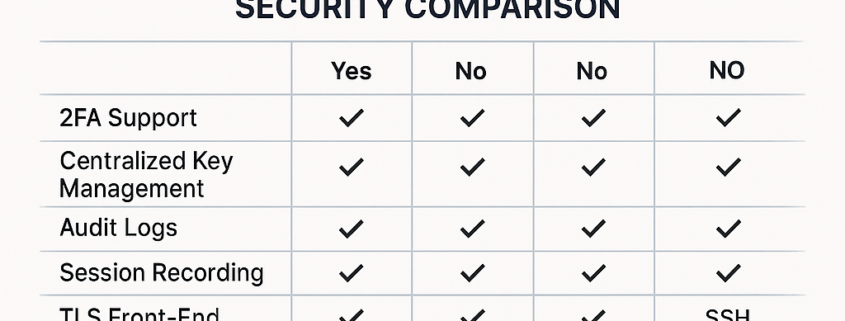
Choosing the right SSH tool is becoming increasingly important as teams manage more servers, more users, and more complex security requirements. In this comparison of Bastillion vs Nexterm, with xterm, Remmina, and native terminals included, you’ll find a complete breakdown of features, security, usability, and performance to help you select the best SSH solution for your workflow.
What Each SSH Tool Is Designed For
Bastillion is a modern, web-based SSH console focused on security, auditing, 2FA, and centralised key management. It’s ideal for teams and enterprise environments that require compliance and oversight.
Nexterm is a sleek, user-friendly SSH client offering tabs, SFTP, multi-session management, and cross-platform support, perfect for individual developers and sysadmins.
xterm is a lightweight terminal emulator offering pure simplicity without extra features.
Remmina provides a GUI for RDP, VNC, and SSH, making it ideal for admins who manage mixed Windows and Linux environments.
Native terminals (macOS Terminal, GNOME Terminal, iTerm2) offer the fastest CLI performance but no team access features.
Security Comparison: Which SSH Tool Protects You Best?
| Feature | Bastillion | Nexterm | xterm | Remmina | Native Terminal |
|---|---|---|---|---|---|
| 2FA Support | Yes | No | No | No | No |
| Centralised Key Management | Yes | No | No | No | No |
| Audit Logs | Yes | No | No | No | No |
| Session Recording | Yes | No | No | No | No |
| TLS Front-End | Yes | Yes | No | No | No |
| Multi-User Controls | Yes | No | No | No | No |
Winner (Security): Bastillion
If your priority is SSH security, compliance, logging, and strict access control, Bastillion is unmatched.
Workflow & Usability Comparison
| Feature | Bastillion | Nexterm | xterm | Remmina | Native Terminal |
|---|---|---|---|---|---|
| Web UI | Yes | Yes | No | No | No |
| Multi-Session Tabs | Yes | Yes | No | Yes | Depends on app |
| SFTP Support | Partial | Yes | No | Yes | No |
| Shared Sessions | Yes | No | No | No | No |
| Key Deployment | Yes | No | No | No | No |
| Protocols Supported | SSH | SSH | SSH | SSH/RDP/VNC | SSH |
Winner (Ease of Use): Nexterm
For individuals who want a clean, modern SSH experience without the complexity of enterprise tools, Nexterm offers the best UX.
Best Use Case for Each SSH Tool
Best for Teams, Enterprises & SOC →
Bastillion
If you need 2FA, auditing, role-based access, and key governance, Bastillion is built for you.
Best for Individual Developers →
Nexterm
Clean UI, tabs, SFTP, and easy SSH make it perfect for personal workflows.
Best for Minimalist Linux Users →
xterm
Low resource usage and reliability.
Best for Mixed Protocol Admins →
Remmina
Ideal for those who manage RDP, VNC, and SSH on the same machine.
Best for Speed & CLI Power →
Native Terminal
Fastest, simplest, script-friendly.
Final Verdict: Bastillion vs Nexterm
- Choose Bastillion if you need secure, audited, multi-user SSH access.
- Choose Nexterm if you want a modern SSH terminal for personal daily use.
- xterm and native terminals remain excellent for simplicity and performance.
- Remmina is best for GUI-heavy environments needing RDP and VNC.
This comparison helps sysadmins, enterprises, and developers find the right SSH tool depending on security needs, workflow preferences, and infrastructure demands.
SEO Schema Markup (JSON-LD)
{
  "@context": "https://schema.org",
  "@type": "Article",
  "headline": "Bastillion vs Nexterm vs xterm vs Remmina: Full SSH Tools Comparison for Security, Performance & Remote Access",
  "description": "Compare Bastillion, Nexterm, xterm, Remmina, and native terminals in this detailed SSH tools guide. Learn which SSH client offers the best security, 2FA, logging, SFTP features, and usability for DevOps, sysadmins, and enterprise security teams.",
  "author": {
    "@type": "Person",
    "name": "DigitalBerg SOC Team"
  },
  "publisher": {
    "@type": "Organization",
    "name": "DigitalBerg",
    "logo": {
      "@type": "ImageObject",
      "url": "https://digitalberg.com/logo.png"
    }
  },
  "keywords": [
    "Bastillion vs Nexterm",
    "Bastillion SSH security",
    "Nexterm SSH client",
    "xterm terminal comparison",
    "Remmina SSH review",
    "best SSH management tool",
    "SSH access control",
    "SSH key management"
  ]
}