CloudFlare, a web performance and security company, is excited to announce our partnership with DIGITALBERG! If you haven’t heard about CloudFlare before, our value proposition is simple: CloudFlare will make any website twice as fast and protect it from a broad range of web threats.
Cloudflare power more than 400 billion monthly page views – more than Amazon, Wikipedia, Twitter, Zynga, AOL, Apple, Bing, eBay, PayPal and Instagram combined – and over 1.2 billion monthly users regularly pass through our network. We’re really glad DigitalBerg has partnered with CloudFlare.
Faster web performance
CloudFlare is designed to take a great hosting platform like DigitalBerg and make it even better.
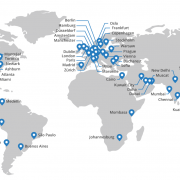
Cloudflare run data centers strategically located around the world. When you sign up for CloudFlare,CloudFlare begin routing your traffic to the nearest data center.
As your traffic passes through the data centers, CloudFlare intelligently determine what parts of your website are static versus dynamic. The static portions are cached on their servers for a short period of time, typically less than 2 hours before CloudFlare check to see if they’ve been updated. By automatically moving the static parts of your site closer to your visitors, the overall performance of your site improves significantly.
CloudFlare’s intelligent caching system also means you save bandwidth, which means saving money, and decreases the load on your servers, which means your web application will run faster and more efficiently than ever. On average, CloudFlare customers see a 60% decrease in bandwidth usage, and a 65% in total requests to their servers. The overall effect is that CloudFlare will typically cut the load time for pages on your site by 50% which means higher engagement and happier visitors.
CloudFlare’s security protections offer a broad range of protections against attacks such as DDoS, hacking or spam submitted to a blog or comment form. What is powerful about CloudFlare approach is that the system gets smarter the more sites that are part of the CloudFlare community. CloudFlare analyze the traffic patterns of hundreds of millions of visitors in real time and adapt the security systems to ensure good traffic gets through and bad traffic is stopped.
In time, our goal is nothing short of making attacks against websites a relic of history. And, given our scale and the billions of different attacks CloudFlare see and adapt to every year, CloudFlare well on our way to achieving that for sites on the CloudFlare network.
Signing up
Any website can deploy CloudFlare, regardless of your underlying platform. By integrating closely with DigitalBerg, CloudFlare make the process of setting up CloudFlare “1 click easy” through your existing DigitalBerg dashboard. Just look for the CloudFlare icon, choose the domain you want to enable, and click the orange cloud. That’s it!
We’ve kept the price as low as possible and plans offered through DigitalBerg are free. Moreover, CloudFlare never charge you for bandwidth or storage, therefore saving you tons via reduced bandwidth costs.
For site owners who would like to take advantage of CloudFlare’s advanced offerings, CloudFlare also offer a ‘Pro’ tier of service for $20/month. The ‘Pro’ tier includes all of the ‘Free’ tier’s offerings, as well as extra features like SSL, full web application firewall and faster analytics.
We’re proud that every day more than a thousand new sites, including some of the largest on the web, join the CloudFlare community. If you’re looking for a faster, safer website, you’ve got a good start with DigitalBerg, but the next step is to join the CloudFlare community.
https://digitalberg.com/wp-content/uploads/2016/05/network-map.png7791800123adminhttps://www.digitalberg.com/wp-content/uploads/2015/04/DigitalBerg-Logo-grey-small-300x92.png123admin2016-05-06 22:01:142016-05-06 22:06:49How CloudFlare increases speed and security of your site
The best WYSIWYG HTML editors help you build web pages visually while keeping a practical route to publishing them. For a quick block-based site, start by comparing Mobirise. For direct work with HTML and CSS, consider Pinegrow or Dreamweaver. Bootstrap Studio suits Bootstrap layouts, while WYSIWYG Web Builder and RapidWeaver Elements offer other visual website-building workflows.
This guide compares six options using their official product information, reviewed on 29 October 2026. These are editorial recommendations based on documented capabilities, not hands-on benchmark results. Try a representative page before buying: the right choice depends on how you edit, export and maintain your website.
WYSIWYG means “What You See Is What You Get”. Instead of writing every element by hand, you arrange content in a visual workspace. Some editors work directly with existing HTML and CSS. Others store an editable project and generate website files when you export. Keep the project as well as the exported files: you may need both for future changes.
A visual preview is a starting point, not a guarantee that every browser will display the page identically. Fonts, content length and screen size can change the layout. A website editor also differs from an embedded rich-text editor used inside a form or content-management system. This article focuses on tools for building complete pages and websites.
Best WYSIWYG HTML editors: quick comparison
Editor
Useful starting point for
Check before choosing
Mobirise
Block-based pages and simple visual editing
Which themes, extensions and code tools need payment
Pinegrow
Editing standard HTML and CSS visually
Whether your framework and workflow suit the available edition
Bootstrap Studio
Visually composing Bootstrap websites
Whether you want a Bootstrap-centred project
Adobe Dreamweaver
Combining code editing with Live View
Subscription terms and the learning curve
WYSIWYG Web Builder
Object-based visual layouts and generated HTML
System requirements, project workflow and server-side features
RapidWeaver Elements
A visual website-building workflow on macOS
Mac requirements and differences from RapidWeaver Classic
Download from the official vendor links below. Free downloads may be trials, and a free base application may sell optional features. Check the current licence, operating-system requirements and export terms rather than relying on an old price comparison.
6 best WYSIWYG HTML editors to consider
1. Mobirise — a starting point for block-based websites
Mobirise provides a desktop website builder with ready-made blocks and visual controls for text, images and page styling. Its official site lists downloads for Windows, macOS and Linux, plus export to a local folder containing HTML, CSS and JavaScript.
Consider it for: a small business brochure, portfolio or landing page when you prefer assembling sections. Check first: the total cost of your chosen themes and extensions, and how much source-code control your project needs. Export a test page and confirm that every feature you use works on your intended hosting.
2. Pinegrow — visual editing of standard HTML and CSS
Pinegrow combines visual editing with code and works with standard website files. Its documented tools cover HTML, CSS, Bootstrap and Tailwind, with responsive views for inspecting layouts at different sizes. The vendor offers a trial and lists Mac, Windows and Linux downloads.
Consider it for: maintaining an existing HTML project or wanting visual controls alongside direct source editing. Check first: which edition supports the features you need. Framework-aware controls can help with layout, but you still benefit from understanding document structure and CSS when troubleshooting a design.
3. Bootstrap Studio — a visual workflow for Bootstrap
Bootstrap Studio is a desktop visual design application built around drag-and-drop components and the Bootstrap framework. Its component library and templates offer a structured way to assemble responsive pages.
Consider it for: projects where Bootstrap is a deliberate choice and reusable components fit your design process. Check first: how the project format, export process and custom code fit your maintenance plans. Build a navigation menu, form and mobile layout during your evaluation rather than judging only a template’s appearance.
4. Adobe Dreamweaver — code editing with a visual preview
Adobe Dreamweaver combines HTML, CSS and JavaScript editing with visual aids and Live View. Adobe also documents Git support and integration with Creative Cloud assets. It is a commercial subscription product with a trial.
Consider it for: a workflow that moves frequently between source code and a rendered page, especially if you already use Adobe tools. Check first: whether the subscription and interface suit your needs. It is worth comparing against a simpler builder if you want to avoid working with code altogether.
5. WYSIWYG Web Builder — object-based visual page design
WYSIWYG Web Builder generates HTML from visually arranged objects. The vendor describes support for layout grids, flexbox, CSS grid, breakpoints and publishing over secure file-transfer methods. It offers a time-limited trial.
Consider it for: building layouts through visual controls with access to forms and extensions. Check first: current system requirements and any PHP or other server requirements for the features you select. A static page and a database-backed form need different hosting capabilities; test the complete feature, not just its visual appearance.
6. RapidWeaver Elements — a visual builder for Mac users
RapidWeaver Elements is Realmac Software’s current macOS visual website builder. The vendor also lists RapidWeaver Classic separately, so do not assume an old RapidWeaver tutorial describes Elements.
Consider it for: a Mac-based visual workflow. Check first: the supported macOS version, licence, publishing options and compatibility with existing projects or add-ons. If you are migrating an older site, test the migration path before committing to a rebuild.
How to choose the best WYSIWYG HTML editors for your project
Shortlist two tools and give each the same small task: create a homepage with navigation, a content section, an image and a contact link. Then export it, open it in a browser and make one revision. This reveals more about the workflow than a long feature list.
Editing model: do you need to open an existing HTML file, or are you comfortable maintaining a builder-specific project?
Responsive layout: test a narrow phone screen, a tablet and a wide desktop. Check long headings and navigation.
Accessibility: check keyboard navigation, visible focus, form labels, contrast, heading order and meaningful image descriptions.
Ownership and export: confirm what you can export, where you can host it and which assets have separate licences.
Maintenance: make sure a second person can locate the project, edit content and reproduce a working export.
Total cost: include updates, extensions, templates and any third-party services your chosen features depend on.
What happened to the older recommendations?
The original version of this article listed openElement, BlueGriffon, KompoZer, Amaya, Serif WebPlus X7, NetObjects Fusion and RapidWeaver 5. That list reflected an older generation of web-design tools and is no longer the shortlist used here.
For example, W3C explicitly states that Amaya development has stopped. For any older application, verify the current official release, operating-system compatibility and support status before installing it. If you need one to recover an existing project, keep a backup and evaluate a migration route. A downloadable installer alone does not establish that a tool is maintained.
Before publishing: performance, SEO and hosting checks
The editor helps you create a page; the exported website still needs a suitable hosting setup. For a simple exported site, review DigitalBerg web hosting and confirm the requirements of any forms or server-side components. Ask DigitalBerg support if you are unsure what your project needs.
Give each page a descriptive title and a useful meta description. Use one clear main heading and a logical hierarchy below it.
Compress images, supply appropriate dimensions and avoid uploading a full-resolution photograph for a small thumbnail.
Keep scripts and third-party widgets purposeful. Check loading speed on an actual mobile connection.
Use HTTPS and a secure publishing method supported by your host. Store credentials outside shared project files.
Test internal links, missing pages and forms after upload. A form’s design does not provide message delivery by itself.
Keep both source projects and published exports backed up. Verify that you can restore the site before a major redesign.
Frequently asked questions
Which WYSIWYG HTML editor is best for beginners?
Start by comparing Mobirise’s block-based approach with a visual builder that fits your computer and budget. The easiest tool is the one that lets you finish and maintain your own test page without relying on features you cannot afford or operate.
Are there free WYSIWYG HTML editors?
Mobirise advertises a free base builder, while several commercial products offer trials. Check what is included: a free download does not necessarily include every template, extension or editing feature.
Can I edit an existing website visually?
It depends on the editor and the website. Pinegrow is designed to work with standard HTML and CSS. A builder that generates HTML from its own project may not reconstruct an arbitrary exported site into the same editable project. Try a copy of your files first.
Will a visual editor improve my Google rankings?
An editor alone does not guarantee rankings. Focus on useful content, accessible navigation, crawlable pages, sensible metadata and a website that works well on mobile. Review the published output, not just the editor preview.
Do I need WordPress for an exported HTML website?
No. A static HTML website can be hosted without WordPress. WordPress may be more suitable when you need frequent publishing, multiple authors or content-management features. Choose according to the work you need to do after launch.
Last reviewed: 29 October 2026. Product capabilities and licensing can change. The linked official product pages are the sources for this comparison; verify current terms before downloading or purchasing.
https://digitalberg.com/wp-content/uploads/2016/02/maxresdefault-e1455523636883.jpg4571181123adminhttps://www.digitalberg.com/wp-content/uploads/2015/04/DigitalBerg-Logo-grey-small-300x92.png123admin2016-02-15 08:15:402026-10-29 03:41:176 Best WYSIWYG HTML Editors: The Ultimate 2026 Guide
Totally free SSD Hosting with Free CPanel. No monthly Charge Unlimited hosting Features.
Complete SSD Solution – Your Files, OS & Database.
Profit or nonprofit business, students, registered charities, can take advantage of free web hostingon this big hosting package. All that we ask in return is that you place a small bannerwith Link or Link us on your site footer to show our support.
We are offering a SSD shared free web hosting plan unlike any other – Powerful and features-rich, with unlimited bandwidth. It is ideal for an entry-level website or blog website.
DigitalBerghas helped countless entrepreneurs, developers, designers, and content creators put their visions online in new, exciting ways. You can be next! Bring your dreams to fruition utilising our hosting services, and our devoted expert team will help you!
DigitalBerg Plans For You
1GB SSD FREE STORAGE
If you upload content directly related to your website, reach for the stars! Just abide by ourUnlimited Policy.
UNLIMITED TRAFFIC
You can get any amount of traffic to your website; the sky’s the limit, so long as you abide by our simple unlimited policy.
FREE FIVE DATABASE
Through your user-friendly Cpanel, you have access to tech support and can create email addresses as well as unlimited MySQL databases.
FREE FIVE DOMAIN
Host and manage multiple domains and websites within a single account, without extra charge.
FREE FIVE WORDPRESS
We install WordPress with a click of a button on your hosting account. Get your WP blog or site online fast.
FREE FIVE EMAILS
Create as many email addresses as you want and manage them all in one account (POP, IMAP, SMTP), with auto-responders included.
What People Share about us on Social Media?
I have created my site using @DigitalBergCS free SSD web hosting! Thanks for this amazing New Year Gift.Feeling Excited
Hail @DigitalBergCS
https://digitalberg.com/wp-content/uploads/2016/01/rRTkcor.jpg340520123adminhttps://www.digitalberg.com/wp-content/uploads/2015/04/DigitalBerg-Logo-grey-small-300x92.png123admin2016-01-03 08:41:502016-01-06 11:54:55DigitalBerg is Offering Free Web Hosting as New Year Gift

 Faster web performance